Signal Login and the payment trail it leaves
In Taiwan, Hong Kong and Macau, every mobile number, prepaid SIMs included, is registered to a real identity, and the same holds across most of East and Southeast Asia. A Signal account is opened against a phone number, so however strong the encryption, the carrier's registration record ties the account to a named person. For journalists' sources, activists working across borders, and anyone who does not want their account traced back to them, the phone number has long been the most cited limitation of Signal.
In September 2026 Signal's Android beta opened a way to register without a phone number, called Signal Login, in exchange for a small one-time payment. The obvious worry followed: doesn't the payment record bring your identity right back? Signal reuses the zero-knowledge credentials from its donation system so that an account cannot be matched to a specific purchase. The payment date still travels with the account, however, and Google keeps a record that you bought it. Whether to use Signal Login, and how to pay, depends on which kind of tracing you need to defend against.
Status at the time of writing
This post reflects the Android beta as of September 2026 (Signal Login was enabled from 8.28.1; the latest beta on 23 September was 8.28.4). Pricing, payment methods and the iOS timeline may change before the stable release, and updates will be added at the end.
What the phone number does on a Signal account
Since 2024 Signal has offered usernames1. Contacts can exchange usernames instead of numbers, and you can set your number so that nobody can see it or find you by it. That hides the number from other people, but Signal's servers still store the number bound to every account.
According to Signal's published responses to government requests, the only data it can produce is the date an account was created and the date it last connected2. Message content, contacts and groups are not included. Anyone holding a phone number, though, can ask Signal whether that number is registered and since when, then go to the carrier for the subscriber's registration details. That scope is what Signal itself reports about the data its servers currently keep. It is a policy and implementation fact, not a cryptographic guarantee, and it changes when the system design changes (Signal Login adds a new record, as shown below).
The phone number carries a second risk. Registration is verified by SMS, so after a SIM swap or an intercepted verification code, someone else can re-register your number. Signal's Registration Lock blocks this, but users have to turn it on themselves. Signal Login has no phone number and therefore no SMS verification path.
How Signal Login registration works
Greyson Parrelli, an Android developer at Signal, announced Signal Login on the Signal Community Forum on 16 September3. It is available only to Android beta testers for now, and there is no published timeline for the stable release or for iOS.
During registration you choose Register Without Phone Number and pay a one-time fee. Signal's support page lists US$2.99, the forum announcement says about US$3, and prices vary by country. After payment, Signal generates a 32-character Account ID and a 64-character key (the forum calls it the Account Key, the support page the Recovery Key)4. The two work like a username and password and replace the phone number as your login identity.
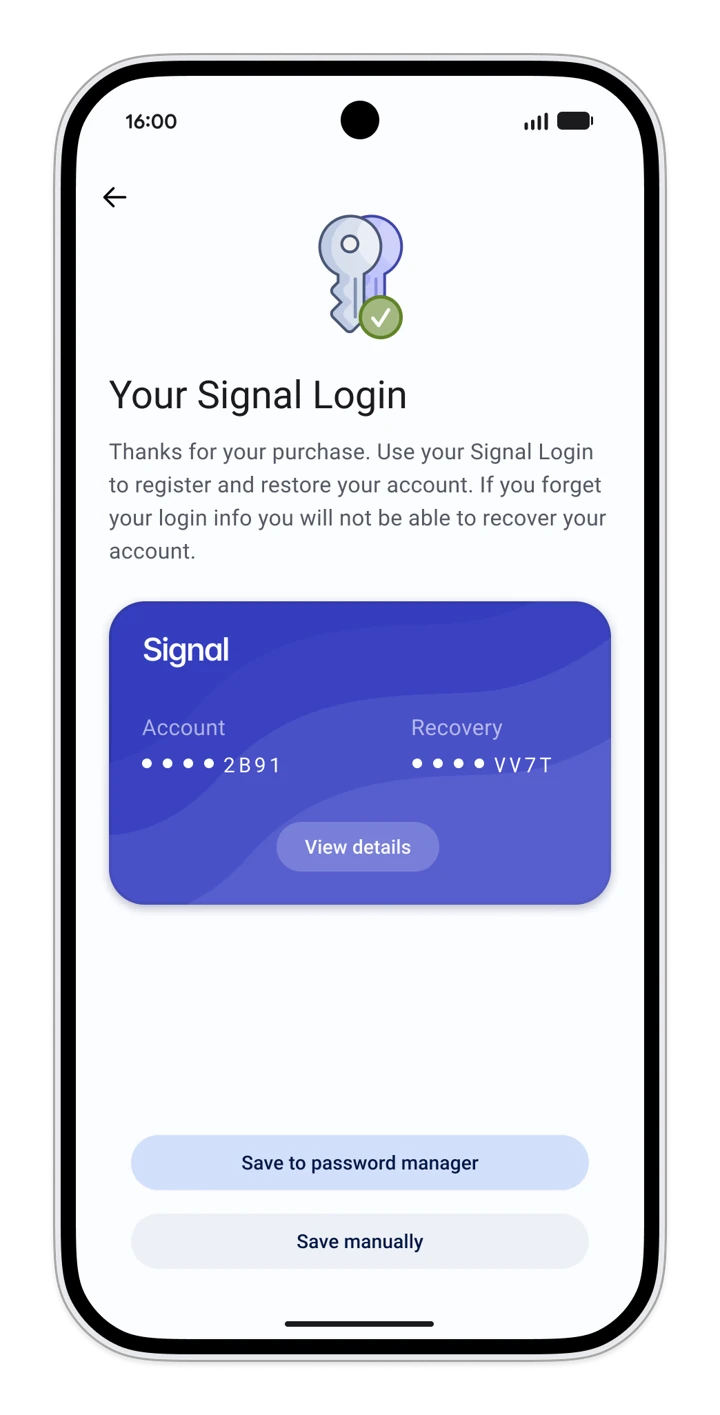
The fee exists to keep spam accounts out. In the words of the announcement: "If it was free, spammers would acquire massive numbers of these accounts and ruin our network."3 Registering with a phone number remains free and remains the main way to sign up. Paid registration is an additional option.
The Account ID and key also replace the Signal PIN. Lose them and the account cannot be recovered, since Signal has no other recovery channel. Signal recommends keeping them in a password manager.
Accounts can add TOTP two-factor authentication (the one-time codes generated by apps such as Google Authenticator). Once it is set, someone who obtains your Account ID and key still cannot log in on another device without the code11, so the authenticator app is best kept on a different device. The flip side is that losing every second factor locks the account permanently, and the forum announcement recommends setting up more than one3.
Without a phone number, the numbers in your friends' address books will not match your account either. A username is optional. Without one, nobody can find you and only you can start a conversation. Linked devices such as Signal Desktop work the same way as on a phone-number account. Only new accounts can register this way for now, and existing accounts cannot remove their phone number.
The zero-knowledge credential between payment and account
Signal Login payments reuse the zero-knowledge proofs of Signal's donation system (a cryptographic method that proves you meet a condition without revealing anything else)3. As Signal's donor FAQ explains, after paying, the app obtains a credential from the server. The server can verify that whoever presents it belongs to the set of people who paid, but the credential carries nothing that points to a particular payment5. Signal's private groups use the same anonymous credential scheme.
Applied to registration, Signal's servers hold a record of a Signal Login payment and see a new account presenting a valid credential. The credential cannot be traced to a specific payment. The payment date, however, is kept.
Signal's server code is public. When the credential is issued, its expiration is set to the Google Play payment time plus five years, truncated to the day6. When the account is created, the server writes that expiration date into the database alongside the account identifier7, and subtracting five years gives the day of payment. A separate table keeps the identifier of every Google Play purchase with the same expiration date, retained until 30 days after expiry10. From Signal's own data, then, you can work out which day each Signal Login account was paid for, and list the identifier of every purchase made that day. Google can map those identifiers back to Google accounts, and everyone who paid that day becomes a list of names.
The record on the payment side
The cut described above happens only on Signal's servers. The payment itself goes through a Google Play in-app purchase. According to the forum announcement, this is the only payment method for now, with others planned3. Like any in-app purchase, Google's record shows which Google account bought what from Signal, and when.
| Who holds a record | What it can show | What it cannot show |
|---|---|---|
| A given Google account bought Signal Login at a given time | Which Signal account was created afterwards | |
| Card issuer or carrier | A payment to Google Play, possibly with the app name on the statement | Same as above |
| Signal | The payment date of each Signal Login account (to the day), its registration time, and the Google Play identifier of every purchase | Which payment created which account |
On its own, the payment record proves at most that you bought Signal Login, which is to say you very likely have a Signal account without a phone number. It does not reveal which account, let alone the contacts and messages inside it. Narrowing that down requires combining Google's and Signal's data (see the next section). A phone number is different: the number is itself the account identifier, and having the number leads straight to the account.
How you pay determines how closely that record ties back to you. In Taiwan, the common Google Play payment methods are8:
- Credit or debit card: the issuing bank ran identity checks (KYC) when the account was opened, so the record points straight at you
- Carrier billing: the charge goes on your mobile bill, which puts the payment back on the very phone number you were trying to avoid
- PayPal and convenience-store payment: both are tied to an account, and convenience-store payment requires linking an E.SUN e-Pay account first, which is not the same as paying cash at the counter
- Google Play gift cards: bought with cash at a convenience store and redeemed to your balance, so the payment never touches a bank or carrier
A gift card only handles the money. Google accounts are usually tied to a phone number or another email address, and signing in to Google Play on a device leaves its own trail. Detaching the Google account from your identity requires a separate account with no personal data. Google's privacy policy states that it collects unique device identifiers and, when you are signed in, stores that information with your Google Account12. If the same phone signs in first to your real-name account and then to the new one, both accounts' records may point to the same device, so a full separation needs a phone that has never been signed in to your real-name account. The same policy lists mobile network information, including carrier name and phone number, among the data it collects. With your real-name SIM in the phone, the Google account that paid may be linked to that number, and you end up back at the phone number. For why payments are so hard to anonymize in general, see Why anonymous payments matter.
Open problems
Payment and registration happen almost at the same moment, and both timestamps can be requested. Signal provides account creation times in its responses to government requests2, and Google has the exact payment time and payer. Put together, anyone who paid in the few minutes before registration is a candidate. Even with Signal's data alone, the payment date narrows things down to everyone who paid that day.
During the beta, few people are registering this way, so the same day or the same few minutes may contain only a handful of purchases, which makes matching easy. As more people use it the daily list grows longer, but there is no telling when it will be long enough to hide an individual, so treat the risk as present today. A user on the forum has already raised the same concern and suggested Signal log registration times only to the day3. As of 23 September, Signal had not responded.
The IP address at registration is another trail. In Signal's public server code, the numberless registration path does not read the IP, and account records have no IP field11. Rate limiting and similar mechanisms do handle connection IPs, however, and some of those modules are not open source, so how long anything is retained cannot be confirmed. On the payment side, Google's privacy policy states that it collects IP addresses12. If this concerns you, connect through Tor or a VPN for both the payment and the registration.
Phones without Google Play services cannot pay for now, and so cannot register this way. GrapheneOS ships without Google services, so users must first install sandboxed Google Play and sign in to a Google account before paying9. Signal has not said which other payment methods are coming.
There is no timeline for iOS. The registration steps on Signal's support page mention paying with Apple Pay or Google Pay4, which differs from the Play Store in-app purchase described on the forum, so the support page may not be final.
What to do under different threat models
If all you want is to keep your number away from contacts and strangers, the existing username feature is enough, and iPhone users can set it up today. In Signal's privacy settings, set both who can see your number and who can find you by number to Nobody, and give out only your username.
For people who need their account not to lead back to them, such as journalists' sources or activists working across borders, Signal Login removes the phone number as a direct link, while the payment date and timing correlation remain. Pay with something that bypasses banks, such as a gift card, and keep the Account ID and key in a password manager with a separate backup. The beta may still have bugs and the account key exists in only one copy, so moving important channels over is safer once the stable release is out.
If what you need to defend against is proof that you used Signal at all, Signal Login does not help: the Google purchase record is itself that proof, just as registering with a phone number leaves a record. When even the fact of use must leave no trace, go back to your threat model, and see the next section for alternatives.
Alternatives to Signal
If you conclude that Signal Login is not enough, pick a tool according to which layer the risk sits in (a fuller comparison is in Secure messaging compared).
| Risk identified | Alternative | Why it fits | Main costs |
|---|---|---|---|
| The account can be traced back to you | SimpleX | No user identifiers of any kind, a separate queue for each conversation, and no phone number, email or payment needed to sign up | Steep learning curve, no conventional contact list |
| Same, but you want something closer to a regular messenger | Threema | No phone number or email required, a randomly generated 8-character Threema ID, and license keys sold in Threema's own shop for cash or Bitcoin, bypassing Google and Apple | Paid: 6 USD or 6 EUR depending on store and country. Servers are run centrally by Threema in Switzerland. Without a linked phone number or email, a forgotten ID cannot be recovered |
| Same, without paying | Session | Random account ID recovered from a mnemonic phrase, traffic routed over multiple hops | The current release has no forward secrecy: every message is encrypted under the same long-term key, so if that key leaks, past messages can be decrypted. The new protocol with forward secrecy has not shipped13. Weaker group features and higher latency |
| You do not trust any central server, or worry about server-side records being requested | Briar | Peer-to-peer with no central server, and it can still exchange messages over Bluetooth and Wi-Fi at close range when the internet is down | No iOS version, one device is one account, and both sides must be online at the same time (a spare Android phone can run Briar Mailbox to receive messages) |
| Long-term group collaboration where you want to control the server | Matrix (self-hosted homeserver) | The community decides how the server and its records are kept | The homeserver can see who is in which room and when they post, and public rooms are unencrypted by default |
| Your phone may be seized or inspected | Molly | An Android fork of Signal: chat history on the phone cannot be opened without a passphrase, it locks automatically after a period of inactivity, and notifications can avoid Google's push service | Still uses Signal's servers and still needs a Signal account, so it only covers the device layer |
If the only problem is that Signal is blocked where you are, try a Signal Proxy before switching tools.
Switching tools means the people you talk to have to install the new one too. A workable approach is to split: move only your few most sensitive contacts to the new tool and leave other conversations where they are.
Installing SimpleX or Session from Google Play or the App Store leaves a download record in your Google or Apple account, the same kind of problem as the Signal Login payment record. On Android you can use F-Droid or an APK from the official website instead; iOS has no such option.
SimpleX handles identity but not a seized phone. Briar avoids servers but has no iOS version. Each tool covers only some layers, so decide which layer you need to defend first, then choose. Threat modeling explains how.
Deleting a Signal account
Uninstalling the app leaves the account on Signal's servers, along with its phone number and registration time. Delete it properly from Settings → Account → Delete account in the app. Before deleting, hand group admin rights to other members and tell your contacts your new contact details through another channel, so they do not keep messaging an account you no longer use.
Further reading
- Metadata, and why it matters: after messages are encrypted, who talks to whom and when is still visible
- Why anonymous payments matter: why payment records are harder to erase than other metadata
- Secure messaging compared: how Signal, SimpleX, Session, Briar and Matrix handle identity
- Journalists and source protection: first contact with sources and exchanging contact details and files
- Device minimization and border crossings in Asia: SIM registration, device checks at the border and cross-border numbers around the region
- Activists and protest digital safety: communications and device settings during actions, and what to do if stopped
- Introducing Automatic Key Verification: another security update Signal shipped in August 2026
-
Keep your phone number private with Signal usernames - Signal Blog ↩
-
Government Communication - Signal ↩↩
-
Beta feedback for the upcoming Android 8.28 release - Signal Community Forum ↩↩↩↩↩↩
-
Phone Numberless Registration for Android - Signal Support ↩↩
-
Donor FAQs - Signal Support ↩
-
LoginPurchaseManager.java - signalapp/Signal-Server ↩
-
Accounts.java, RedeemedReceiptsManager.java - signalapp/Signal-Server ↩
-
Google Play 接受的付款方式 - 台灣 - Google Play Help (Traditional Chinese) ↩
-
GrapheneOS usage guide - GrapheneOS ↩
-
IssuedReceiptsManager.java - signalapp/Signal-Server ↩
-
RegistrationController.java - signalapp/Signal-Server ↩↩
-
Google Privacy Policy - Google ↩↩
-
Session Protocol V2 - Session ↩