VPN: risks and how to choose
For civil-society groups, human-rights organizations, and journalists, installing a VPN is almost a reflex of getting "security-ready". But many people install one and assume they are safe, without understanding what a VPN actually changes. A VPN does not remove the party watching you — it moves the party that can see all your traffic from your ISP to the VPN provider. In some situations that trade is worth it; in others it concentrates risk onto a single point that is harder to verify.
This page answers three questions: what the concrete risks of a VPN are, how to choose among the services on the market, and how to judge whether a VPN is usable where you are. Before you start, it helps to think through your security plan so you know which adversary you actually face, and how Tor differs from a VPN (see the Tor Project).
No time to read it all? Start here.
- A VPN changes who can see your traffic. It moves trust from your ISP to the VPN provider — it does not make you anonymous.
- For everyday protection against public Wi-Fi snooping and for unblocking geo-restricted sites, an independently audited, ownership-transparent provider is enough. If you have no preference, start with Mullvad or Proton VPN.
- To resist an adversary who can subpoena the provider, or to protect a source, a VPN is not enough — use Tor.
- In heavily censored places (China, Myanmar, and others), pick a service with obfuscation and test it before you travel. For the pre-departure workflow, see Pre-departure digital safety.
What a VPN actually changes
A VPN works by encrypting your device's network traffic, sending it first to the VPN provider's server, and then connecting out from there. To the ISP, public Wi-Fi, or local network operator on your side, all they see is that you connected to some VPN server — not which sites you are actually visiting. But at the other end of that tunnel, the VPN provider can see where you connect, when, and for how long.
What a VPN can do:
- On public Wi-Fi, hotels, and venue networks, block same-segment eavesdropping and local-ISP logging of what you browse.
- Hide the source IP and rough geographic location you reveal to the destination site.
- Get around ISP-level blocking (when your carrier blocks a particular site).
What a VPN cannot do:
- Make you anonymous. The Google, Facebook, or bank account you log into still recognizes you; browser fingerprint, cookies, and login state all remain.
- Hide your activity from the VPN provider itself. The provider is the new single point: its logs, its jurisdiction, and its honesty all become your risk.
- Stop malware, phishing, or a device that has already been compromised.
Even with a VPN on, the timing of your connections, the size of your traffic, the account you log into, and your browser fingerprint — all that metadata remains. A VPN only handles the connection layer. For why that layer is a separate risk, see why metadata matters.
The difference from Tor is in how trust is distributed. Tor routes your connection through three mutually independent relays (volunteer-run intermediate nodes), so no single node knows both who you are and where you are going — you don't have to trust any single node. A VPN concentrates trust in one provider, and your privacy depends on whether that provider is honest and whether it can be compelled to talk.
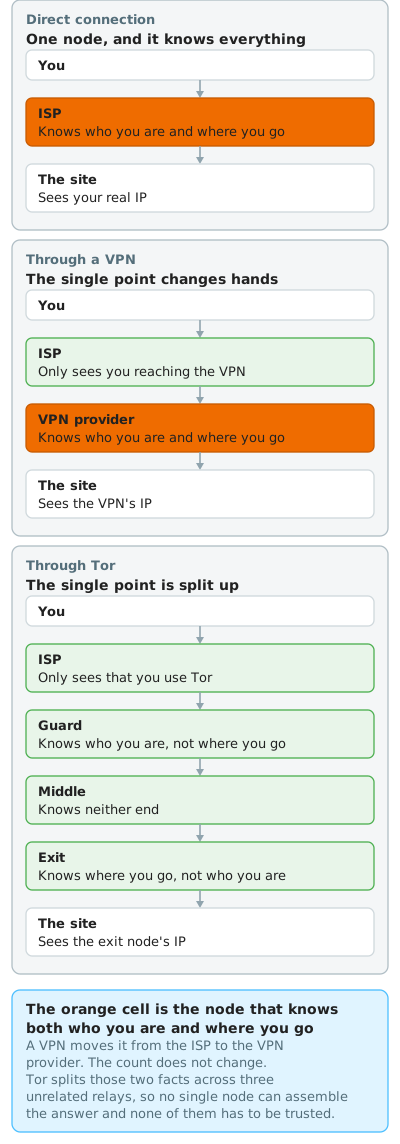
The trust question above, drawn out. The orange box is the node that knows both who you are and where you are going. Connecting directly that is your ISP; with a VPN it becomes the provider. The count stays at one, and what changes is which company it is. The Tor row has no orange box, because those two facts are split across three unrelated relays.
The concrete risks
- Concentrated trust: "Doesn't log" is not the same as "can't log". The VPN provider can technically see all your traffic. Most providers claim no-log (they don't keep usage records), but there is a gap between the claim and the practice. A "no-log" claim with no independent audit and no real-world case behind it is just marketing copy. A few providers have proof: in April 2023 Swedish police arrived at Mullvad's office with a search warrant to seize computers holding customer data, and left empty-handed because that data simply does not exist1. Having nothing to hand over after a search is what no-log actually means.
- Jurisdiction and data-retention law: The law of the country the provider operates in decides whether it can — and must — hand over data. Some countries mandate data retention (for example Vietnam's cybersecurity law requires in-country providers to retain data), so a service based in such a jurisdiction is bound by local law no matter how it markets its no-log policy. When picking a service, check where the company is registered and where its servers are.
- Opaque ownership: Many seemingly independent brands belong to the same parent group. Kape Technologies (formerly Crossrider, whose developer platform was widely exploited to distribute adware and unwanted software, renamed in 20183) now owns ExpressVPN, CyberGhost, Private Internet Access, and ZenMate, and has also bought several VPN review sites — playing both player and referee. NordVPN and Surfshark came under the same parent, Nord Security, in 20224. This doesn't mean those services are necessarily unsafe, but the reassurance of "I compared several before choosing" may just be different signs over the same company.
- The free-VPN business model: A free VPN has to make money somewhere. A 2016 academic study of 283 VPN apps on Google Play found that 38% were flagged by antivirus engines as containing some form of malware, 18% did not encrypt traffic at all, and 84% leaked IPv6 traffic — and 75% embedded third-party tracking libraries5. The data is from 2016 and the app ecosystem has changed, but the underlying model — free VPNs monetizing user data or ads — has not. For something free and trustworthy, see the non-profit options further down.
- Payment leaves an identity trail: Subscribing to a VPN with a credit card tied to your real name leaves the provider a record of whose account this is. If anonymity is genuinely in your threat model, the payment method (cash, or a privacy coin like Monero that is designed to be hard to trace) matters as much as whether signup requires an email. If the signup email is shared with other sensitive services, accounts can be linked across them — use a dedicated email plus a password manager to isolate them.
- Connection leaks: Even with the VPN on, your real IP can escape through a few gaps. The common ones are DNS queries (the lookups that turn a hostname into an IP) not going through the VPN tunnel, IPv6 (the newer IP-address format) traffic not being captured by the tunnel, and the browser's WebRTC (a browser real-time-communication feature) exposing your local IP directly. A competent VPN client should have a kill switch (a switch that cuts all traffic the moment the VPN drops), so your real IP isn't exposed in the instant the VPN disconnects. After setup, it's worth running a leak test once — see the FAQ at the end for how.
- In a censored country, using a VPN is itself a risk: In heavily censored regions, VPN traffic can be identified by DPI (deep packet inspection — analyzing each connection to decide whether to let it through) and then blocked, and the use itself may be illegal. Myanmar's Cybersecurity Law, enacted in January 2025 and in force from July 2025, criminalizes providing unauthorized VPN services, with up to one to six months' imprisonment or a fine, and has extraterritorial reach. The law primarily targets unauthorized VPN providers; whether it applies to individual use remains unclear6. In China, individual circumvention has long been a legal grey area, and in late 2025 officials publicly warned that circumvention would be pursued7. These places need services with obfuscation (disguising VPN traffic as ordinary HTTPS) — for regional detail see the section below.
- Treating a VPN as an anonymity tool is the most dangerous misconception: What a VPN provides is privacy (encrypted content, hidden IP). For anonymity, use Tor. Using a VPN as an anonymity tool in a high-risk situation means entrusting your safety entirely to one company's integrity record.
How to choose a VPN you can trust
Turn the risks above into a checklist and work through it in order when picking a service. If you don't have time to check everything, the first three (jurisdiction, independently audited no-log, ownership transparency) matter most — start there.
Evaluation criteria:
- Jurisdiction: The law of the company's country of registration and its server locations: is there mandatory data retention, and how easily can it be subpoenaed?
- Independently audited no-log: Don't go by the claim; look for whether a third party (Cure53, Assured, Securitum, etc.) has audited it, and whether a real-world search has tested it.
- Ownership and transparency: Who is the parent company, are there regular transparency reports, and is it playing both player and referee?
- Anonymous signup and payment: Can you sign up without an email, and pay with cash or Monero?
- Protocols and obfuscation: Modern protocols like WireGuard and OpenVPN — plus obfuscation if you're in a censored region.
- Open source: Client (and ideally infrastructure) code published for external scrutiny.
- RAM-only infrastructure: Servers running from memory only, never writing to disk, wiped on power-off, to reduce exposure if seized.
Comparison at a glance
| Service | Jurisdiction | Audited no-log | Ownership transparency | Anonymous signup/payment | Obfuscation | Open source |
|---|---|---|---|---|---|---|
| Mullvad | Sweden | Yes | High | No email; cash, Monero, BTC | Yes (Shadowsocks bridge) | Yes |
| Proton VPN | Switzerland | Yes | High | BTC, cash | Yes (Stealth protocol) | Yes |
| IVPN | Gibraltar | Yes | High | Monero, cash, BTC | Limited (mainly multi-hop) | Yes |
| Riseup VPN, CalyxVPN | Non-profit | No logs (non-profit) | High | Free, for the rights community | Limited | Yes (LEAP/Bitmask) |
| (reference) ExpressVPN | British Virgin Islands | Yes | Low (Kape group) | BTC | Yes (automatic obfuscation) | Protocol only (Lightway) |
| (reference) NordVPN, Surfshark | Panama, Netherlands | Yes | Medium (both Nord Security) | Crypto | Yes | Partial |
Most mainstream commercial services have also been audited, so the table puts the distinctions in ownership transparency, anonymous signup and payment, and open source. Verified 2026-06. VPN ownership, audit results, and local laws can change at any time; treat each provider's latest audit report and current local rules as authoritative, and cross-check a non-commercial index like Privacy Guides.
Why obfuscation matters more and more
Obfuscation is the column to confirm first. Censors' methods for blocking VPNs have evolved from the early days of blocking VPN server IPs to inspecting what the traffic looks like. A standard WireGuard or OpenVPN connection carries a fixed, recognizable signature at handshake time, and DPI spots it as a VPN at a glance and cuts it. Obfuscation wraps the VPN traffic to look like ordinary HTTPS web browsing, so the detection system can't identify it. Whether a service has obfuscation often directly decides whether you can connect at all in a heavily censored region.
Obfuscation is not a "more is better" setting; whether to enable it depends on where you are and which kind of censorship you face. In environments with no systematic blocking (most democracies), you don't need it — standard protocols are faster and more stable. Obfuscation is for DPI-heavy environments like China, Myanmar, and Iran, and the cost is usually some speed.
Each product page has its own marketing name, but they all point to the same obfuscation technique:
- Shadowsocks- and v2ray-style bridges (Mullvad offers Shadowsocks).
- Wrapping WireGuard inside TLS (Proton VPN's Stealth).
- Vendor-specific names: ExpressVPN's automatic obfuscation, NordVPN's NordWhisper, Surfshark's Camouflage Mode, Astrill's StealthVPN.
Two cautions. First, strong censorship systems use active probing (actively connecting to a suspicious server to test whether it's a VPN or proxy — China's Great Firewall does this), so only obfuscation that withstands probing holds up. Second, obfuscation is never settled once and for all: censors keep updating their detection, and a protocol that works today may be blocked next month — so carry two or more options and actually test before you travel. If obfuscated protocols are also blocked, fall back to Tor's WebTunnel or Snowflake bridges.
The services that meet the criteria above are described one by one below. Pick one that fits your threat model — you don't have to read them all. Without a particular technical background and on a limited budget, starting with Proton VPN's free plan or Mullvad is the least hassle.
Mullvad
Mullvad goes furthest on privacy by design. Signup needs no email — you just get a random account number. Payment accepts cash by mail, Monero, and Bitcoin, so you needn't tie your identity in. In September 2023 it completed a migration to RAM-only across all servers2; its infrastructure and apps have been audited multiple times by firms including Cure53, its web app independently audited by Assured, and the client is open source. The Swedish police search mentioned earlier is the proof of Mullvad's no-log policy in practice.
Who it's for: people who put anonymity in their threat model, those who want to pay with cash or Monero and leave no identity trail, and journalists and organizations who need a service that holds up under a search.
Limitations:
- Port forwarding was removed to reduce fingerprinting, which affects some P2P and self-hosting scenarios.
- Single flat pricing (a fixed monthly rate), with no long-term discounts.
- Weak at unblocking streaming geo-restrictions — that isn't its design goal.
Proton VPN
Proton VPN (the same Swiss company as Proton Mail) has its biggest advantage in an unlimited free plan, plus the Stealth protocol built for anti-censorship (wrapping WireGuard inside TLS to get through DPI blocking8). The client is open source across platforms, it has passed no-log audits for several years running, and it offers Secure Core multi-hop routing.
Who it's for: people on a limited budget who want a trustworthy free plan, people who need obfuscation in a censored region, and people already in the Proton ecosystem.
Limitations:
- The free plan is limited in server countries and speed; full features require payment.
- Stealth claims to get through strong blocking, but real-world reachability changes as blocking is updated — for places like China you still need to test before you travel and cannot count on it working.
IVPN
IVPN is a long-established Gibraltar service: strict no-log, accepts Monero and cash, supports multi-hop, client open-sourced under GPLv3, and audited annually by Cure53. It deliberately drops affiliate marketing and limited-time promotions to avoid letting sales tactics distort user judgment.
Who it's for: advanced users who value transparency and an audit record, who don't want to be led by marketing, and who need multi-hop.
Limitations:
- A smaller ecosystem and fewer servers than the big providers.
- Not cheap, and no free plan.
- Obfuscation is mainly via multi-hop, so its resistance in heavily censored regions is weaker than a dedicated obfuscation protocol.
Riseup VPN, CalyxVPN
Riseup VPN and CalyxVPN are provided by non-profits, both built technically on LEAP's Bitmask platform, free for the human-rights and activist community, and not logging user IPs. The Calyx Institute is a US 501(c)(3) non-profit, and Riseup VPN is free to download, while Riseup as a whole is positioned for activists who share its mission.
Who it's for: activists and movement communities on a limited budget who need a free, basic privacy tool that doesn't survive by selling data.
Limitations:
- Limited capacity, speed, and server choice.
- Riseup is positioned to serve movement communities — understand and align with its mission before using it.
- Obfuscation is limited; it's enough as everyday basic privacy, but high-sensitivity anonymity still needs Tor.
Mainstream commercial services (ExpressVPN, NordVPN, Surfshark, etc.)
These large providers have their advantages in speed, compatibility (unblocking geo-restrictions, streaming), support, and one-tap obfuscation, and all have been third-party audited. The trade-off is concentrated ownership and a marketing orientation: ExpressVPN belongs to Kape (which also runs VPN review sites), and NordVPN and Surfshark both belong to Nord Security. They're enough for everyday protection against public Wi-Fi snooping and for unblocking geo-restrictions, but in genuinely high-sensitivity situations where a mistake is unaffordable, their trustworthiness and transparency fall short of the services above.
Red flags: avoid these
- Free VPN apps of unknown provenance — most make money by selling your data or pushing ads.
- Treating a browser's built-in free VPN as full protection — its coverage and guarantees are usually very limited.
- Services that claim no-log only on a marketing page, with no third-party audit or real-world case behind it.
If you'd rather not just take our word for it, cross-check Privacy Guides' VPN recommendations. Unlike the Kape-owned review sites mentioned earlier, it takes no advertisers and earns no referral cuts, its selection criteria are public, and it currently lists the same three — Mullvad, Proton VPN, IVPN9.
Self-hosting a VPN
Self-hosting a VPN is another option: it moves trust from the VPN provider to the VPS provider you rent and to your own operational competence. Three common tools:
- WireGuard: a modern, lean VPN protocol you run yourself on a VPS.
- Algo VPN: a set of Ansible scripts maintained by Trail of Bits that stands up WireGuard on a cloud host in minutes, deliberately keeping the install footprint (attack surface) small to reduce supply-chain risk10.
- Outline: an anti-censorship self-hosting solution developed by Google Jigsaw for journalists and newsrooms, based on Shadowsocks; since January 2026 it has been run by the independent Outline Foundation, with Jigsaw continuing as a contributing partner11.
Trade-offs to think through first:
- You no longer trust the VPN provider, but you now trust your VPS provider (which can equally see the server's traffic) and your own operations (with no vendor to help when a setting is wrong).
- A self-hosted VPN's exit IP is usually yours alone, which actually makes it easier to trace back to an individual. The anonymity it offers is limited; it suits secure internal connections for an organization and individual circumvention, not high-sensitivity scenarios that need to hide who you are. For anonymity it's still Tor.
- Against censorship, the obfuscation of a Shadowsocks solution like Outline is often more resistant to blocking than a commercial VPN's standard protocol.
Who it's for: organizations with technical staff, and journalists and technical workers who want full control over the infrastructure and don't trust commercial providers.
Tor VPN (Beta, Android only for now)
The Tor Project itself has built an app called Tor VPN. It uses the system's VPN mechanism as the interface to route traffic from the apps you select into the Tor network; the underlying engine is Arti (the Rust implementation of Tor) plus Onionmasq12, which makes it a different thing from an ordinary commercial VPN. It's free and open source (BSD 3-Clause), and for now it's Android only (7.0 and up) — there is no iOS or desktop version yet13.
What it means is that the core trade-off of this whole page becomes something you can just install and use. An ordinary VPN concentrates trust in one provider; Tor VPN's exit is Tor's volunteer relays, with no single party seeing both your source and your destination, and each app takes its own independent Tor circuit (connection path) with a different exit IP, reducing the chance of being correlated across apps14.
It's Beta right now — don't use it for anything high-sensitivity
The Tor Project explicitly marks Tor VPN as still in Beta: it may leak information and should not be used for any sensitive purpose12. For high-risk users like human-rights workers and journalists, it is suitable at this stage for testing and getting familiar, while genuinely high-sensitivity tasks still use the mature Tor Browser or Tails. Usability and security will evolve with each version — treat the official latest status as authoritative before adopting it.
A few practical limits:
- The exit is a Tor exit node, so it's slower than an ordinary VPN, and it's not suited to unblocking geo-restrictions or streaming, since most mainstream platforms block Tor exit IPs.
- It's Android only. There is no Tor VPN on iOS; to use Tor on an iPhone or iPad, use the Tor-recommended Onion Browser, optionally paired with Guardian Project's Orbot to harden against leaks18.
- It overlaps heavily with Guardian Project's Orbot, differing in the development team and the underlying engine (Orbot uses the older C-based Tor implementation, Tor VPN uses Arti); the project hasn't said which replaces which15.
On security, in 2025 the Tor Project commissioned Cure53 to do a source-code audit of Tor VPN's Android version and the Onionmasq network layer, with a public report in April 2026 concluding that the core routing is solid with no fundamental problems, the items to improve being input validation, DNS handling, and cleartext config storage. See the community write-up Cure53 completes the Tor VPN security audit.
Can you use a VPN there? Assess first, don't wait until you land
Whether a VPN is usable in a given place has no universal answer — it varies by region and over time. Before you travel or work somewhere, use the framework below to assess, and check current observations on OONI Explorer and the latest country status on Freedom House's Freedom on the Net.
Legality falls roughly into four tiers (to judge risk, not legal advice):
- Legal: everyday use unrestricted, e.g. Taiwan, Japan, and most democracies.
- Regulated: legal, but providers are subject to data-retention or real-name rules, e.g. Vietnam, Macau.
- Grey area: individual use not clearly prohibited, but blocking is aggressive and officials issue warnings, e.g. China, Hong Kong.
- Criminalized: unauthorized provision may break the law (individual use is a contested grey zone), e.g. Myanmar.
Pre-departure and on-the-ground must-dos:
- Install and test the connection before you leave: In heavily censored places, the app stores and the VPN's own site may be unreachable, so downloading after you land is usually too late.
- Carry two or more connection methods: A single protocol often gets blocked; in heavily blocked places (China, Myanmar) use an obfuscated option, since standard WireGuard or OpenVPN can be blocked within seconds.
- Judge whether you need obfuscation: Standard protocols are fine in ordinary regions; only heavily censored places need disguises like Stealth or Shadowsocks.
- Turn on the kill switch to avoid briefly exposing your real IP the moment you switch networks or the VPN drops.
Extra risks in censored countries:
- Using a VPN at all may be identified and flagged by DPI.
- Street checks and border device inspections may search the VPN apps and social content on your device — Myanmar and some regions already have such cases.
- For high-sensitivity tasks, bring a clean device (a dedicated phone with no everyday accounts and no personal data, e.g. a factory reset or a separately prepared one), and assume monitoring throughout. When the VPN won't connect, switch to Tor's WebTunnel or Snowflake bridges; for setup see Set up a Tor WebTunnel.
For the full pre-departure briefing workflow — censorship, legal, SIM, and emergency contacts for any destination — see Pre-departure digital safety.
VPN or Tor?
The two tools solve different problems; choose based on who you need to resist.
- A VPN is enough for encrypting your connection on public Wi-Fi, at venues, and in hotels, for unblocking geo-restrictions, for secure internal connections in an organization, or for speed-sensitive everyday use. Your adversary is the same-segment eavesdropper, the local ISP, geo-blocking.
- You need Tor when the adversary can obtain the VPN provider's records, when you're protecting a source, or for high-sensitivity anonymity. Your adversary can subpoena providers and do traffic correlation.
- Combining the two is for a few situations. Connecting to a VPN first and then into Tor hides from your ISP that you're using Tor, at the cost of one more trust point and some speed. Tor first then out to a VPN is rare and sacrifices some of Tor's anonymity advantage. Most people don't need to stack them, and stacking it wrong is worse — when unsure, use Tor alone.
- In between the two: if you want Tor's distributed trust together with a VPN's whole-app protection, you can try the Tor VPN (Beta) described above — but it's still Beta, so don't use it for anything high-sensitivity.
Regional context: the Sinophone Asia-Pacific
VPN legality and monitoring intensity differ sharply by jurisdiction, and transplanting habits from a permissive environment to a stricter one is dangerous. The same "legal" can mean anything from fully unrestricted, to legal but subject to mandatory real-name retention, to not prohibited for individuals yet actively blocked. The Asia-Pacific region anoni.net watches has all of these side by side.
- Hong Kong: VPNs are legal, with no Great-Firewall-level blanket blocking, but it's a grey area. After the 2020 National Security Law, police used Article 43 to require ISPs to block specific sites via DNS tampering, and HKChronicles and Hong Kong Watch were among those blocked. The 2024 Safeguarding National Security Ordinance, together with a decryption obligation in force from March 2026 (an update to the 2020 National Security Law's implementation rules, requiring a person under a warranted national-security investigation to hand over device passwords, with up to one year's imprisonment for refusal), have sharply tightened the legal basis for device searches and surveillance. Legal does not mean safe — journalists and human-rights workers should treat national-security monitoring and selective blocking as real risks16.
- Macau: VPNs are legal with no systematic blocking; it's regulated. The Cybersecurity Law (Law 13/2019) requires real-name telecom registration; separately, a 2020 amendment to the cybercrime law requires ISPs to retain mapping records that can trace a connection back to a specific user for at least one year17. The connection itself is logged long-term, which sensitive tasks should account for.
- Mainland China: The Great Firewall is in place, and individual circumvention is a grey area. See the censored-country risks above; for current status check OONI Explorer and Freedom House.
What actually matters is often what you left in your accounts and what you published — the connection itself is secondary. A VPN hides your source IP, not the identity you log in with. For the concepts of anonymity versus privacy, see Privacy Guides on common threats.
FAQ
Can I use a free VPN or not?
Two kinds. Free apps of unknown provenance mostly make money by selling your data or pushing ads — avoid them. Trustworthy free options are the few services with a clear funder: Proton VPN has an unlimited free plan, and Riseup and CalyxVPN are provided by non-profits for the rights community. The test is the same — how does it make money, and has it been audited?
Does a VPN make me anonymous?
No. A VPN changes who can see your traffic; it doesn't make the sites you log into, your browser fingerprint, or your cookies disappear, and you still have to trust the VPN provider. For anonymity use Tor.
Should I stack VPN and Tor?
Most people shouldn't. VPN-then-Tor hides from your ISP that you're using Tor, at the cost of one more trust point and some speed. Tor-then-VPN is rare and sacrifices anonymity. When unsure, use Tor alone — it already handles most of the anonymity you want.
My company requires its VPN — is it safe?
A company VPN is usually designed to protect the company network and let you connect back to the intranet, and along the way it can see the traffic passing through it. It protects the organization, not your personal privacy. Fine for work, but don't use a company VPN for private sensitive matters — that hands your browsing record to your employer.
Which kind should I use in China, Myanmar, and the like?
A strongly obfuscated option, installed and tested with at least two before you enter. In China, Tor doesn't connect directly — prefer WebTunnel, Snowflake, and meek as fallbacks. In Myanmar, both VPN services and Tor are treated as blocking targets and use itself may break the law, so assume monitoring throughout and bring a clean device. Reachability changes daily with the blocking, so always check the latest reports before you travel.
How do I tell if my VPN is leaking?
With the VPN connected, open a tool like browserleaks.com that tests IP, DNS, and WebRTC leaks at once, and check whether the IP and DNS shown are the VPN's and whether your original real IP is leaking. It belongs to no VPN provider, though no authority formally vouches for it either — treat it as a handy reference. Confirm the client's kill switch is on. Leaks are most likely when you switch Wi-Fi or your phone moves to mobile data, so test again at those moments.
What should I watch for with a VPN on mobile?
Mullvad, Proton VPN, and IVPN all have official iOS and Android apps — download from the official site or a legitimate app store, and don't use free VPN apps of unknown provenance (see the free-VPN risks above). To use Tor on iOS, there is no Tor VPN for iOS — use Onion Browser (see the Tor VPN section above). To route a whole Android device or selected apps through Tor, there's the Tor VPN (Beta) described above.
Related reading
Get involved
-
Mullvad VPN was subject to a search warrant. Customer data not compromised — Mullvad official blog (2023-04-20) ↩
-
We have successfully completed our migration to RAM-only VPN infrastructure — Mullvad official blog (2023-09-20) ↩
-
Kape Technologies (Formerly Crossrider) Now Owns ExpressVPN, CyberGhost, Private Internet Access, Zenmate — Cyber Insider. See also Kape Technologies — Wikipedia ↩
-
Nord Security joins forces with Surfshark — NordVPN official announcement (2022-02-02) ↩
-
An Analysis of the Privacy and Security Risks of Android VPN Permission-enabled Apps — ACM IMC 2016 (CSIRO, ICSI, UNSW). The data is from 2016 and the app ecosystem has evolved, but the basic business-model problem of free VPNs persists. ↩
-
Myanmar enacts cybersecurity law that aims to restrict use of VPNs — Radio Free Asia. Legal analysis: Myanmar Cybersecurity Law Takes Effect — Tilleke & Gibbins ↩
-
FOTN 2025 China — Freedom House. GFW and circumvention guidance: Tor's guidance for connecting from China — Tor Project. The late-2025 official warning: AI Cop Signals VPN Crackdown — China Media Project ↩
-
Defeat censorship with Stealth, our new VPN protocol — Proton VPN official ↩
-
VPN Services — Privacy Guides (a non-commercial, advertiser-free open-source privacy-tools index) ↩
-
trailofbits/algo — Trail of Bits (GitHub) ↩
-
Introducing the Outline Foundation: An Independent Home for Outline — Jigsaw. Journalist use case: Google has a new tool to outsmart authoritarian internet censorship — MIT Technology Review ↩
-
About Tor VPN — Tor Project official support docs (includes the Beta warning) ↩↩
-
Download and Install — Tor VPN — Tor Project official support docs. BSD 3-Clause license: Tor VPN Beta on F-Droid — F-Droid ↩
-
Tor VPN Threat Model — Tor Project official support docs (per-app circuit and trust model) ↩
-
What's the difference between TorVPN and Orbot — Tor Project official forum (community discussion). Orbot is built on C-Tor: orbot-android — Guardian Project ↩
-
Hong Kong blocking cases and legal basis: Websites blocked in Hong Kong — Hong Kong Free Press. The March 2026 decryption obligation: Hong Kong introduces new requirement for national security suspects to hand over passwords — HKFP. The 2024 Safeguarding National Security Ordinance (Article 23 legislation): Hong Kong: New Security Law a Full-Scale Assault on Rights — Human Rights Watch. Freedom rating: Hong Kong: Freedom in the World 2026 — Freedom House (Freedom on the Net does not assess Hong Kong separately; internet freedom is folded into this report) ↩
-
Macau Cybersecurity Law — Deloitte China. One-year ISP retention of mapping records: Amendments to Macau's law combating cyber crime — International Bar Association ↩
-
iOS official recommendation of Onion Browser: Tor Project download page — Tor Project. The recommendation to pair with Orbot to harden against leaks: Onion Browser Review — Privacy Guides ↩