onionoo MCP: a query service for Tor relays
Want to know how many Tor relays Taiwan is running right now, whether that number has grown or shrunk over the past six months, and which telecoms host them? The answers are all in the Tor Project's public data — but getting them used to mean writing code to fetch and crunch it yourself. onionoo MCP turns that into a single plain-language question. Connect the service inside an AI assistant (such as claude.ai), type "How many working Tor relays does Taiwan have right now?", and it queries, computes, and hands back a readable report.
The first half of this page is for people who want to look up data but don't write code — journalists, civil-society groups, fact-checkers. The second half (for engineers and self-hosters) is for people who want to call it from code or run their own copy.
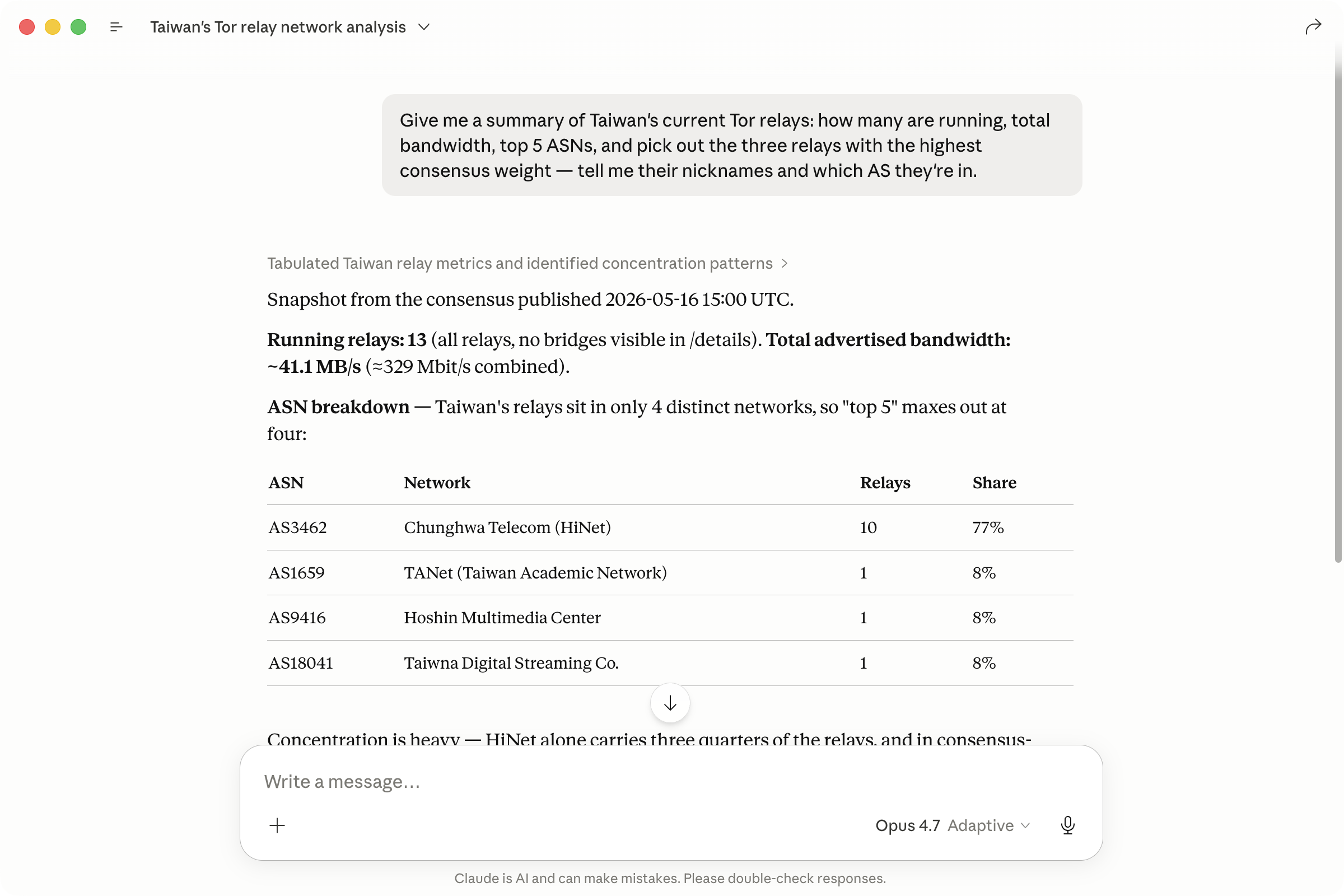
What it can answer for you
- Fact-checking: when someone claims "Taiwan's Tor capacity is tiny," you can ask on the spot how many relays are running, how much total bandwidth there is, and how that compares to an earlier point in time — numbers you can check and cite.
- Reporting: when covering a country's network blocking or circumvention infrastructure, survey how many Tor relays it has and which providers its exit relays (the last hop, where traffic leaves Tor for the ordinary web) cluster in, for a cross-country comparison.
- Civil society and advocacy: gauge how concentrated a region's relays are (across how many telecoms — the more spread out, the harder they are to cut off at once) as a digital-resilience indicator.
Getting started (no code required)
The lowest-barrier way to use this is to connect the service to the cloud AI assistant you already use. Nothing to install, no config file to edit — you add a "custom connector" in the assistant's settings and point it at one URL:
https://onionoo.anoni.net/mcp
Three cloud AI assistants common across the Asia-Pacific region differ in how easy this is right now:
| Cloud AI | Paste a URL in the app? | How to connect |
|---|---|---|
| Claude (claude.ai) | Yes — even on the free plan (1 connector limit) | Settings → Connectors → Add custom connector, paste the URL |
| ChatGPT | Yes, but needs a paid plan (Plus or above; not Free) | Settings → Apps → Advanced → turn on Developer Mode → add a custom connector, paste the URL |
| Google Gemini | Not yet in the consumer chat app | Goes through Gemini CLI (config file) or Gemini Enterprise (Google Cloud admin) — an engineering or enterprise path; see the engineer section |
Plan tiers and the exact location of these settings can change; check each vendor's own docs (Claude1, ChatGPT2, Gemini3).
Claude has the lowest barrier of the three, so here are the full steps using it:
- Open claude.ai (web or desktop) and sign in.
- Open Settings, find Connectors, and click Add custom connector.
- Name it
onionoo, pastehttps://onionoo.anoni.net/mcpas the URL, and click Add. - Go back to a new chat and just ask in plain language (examples below).
If you are on a company or team (Team or Enterprise) account, usually only an account Owner can add connectors — ask your admin to add it.
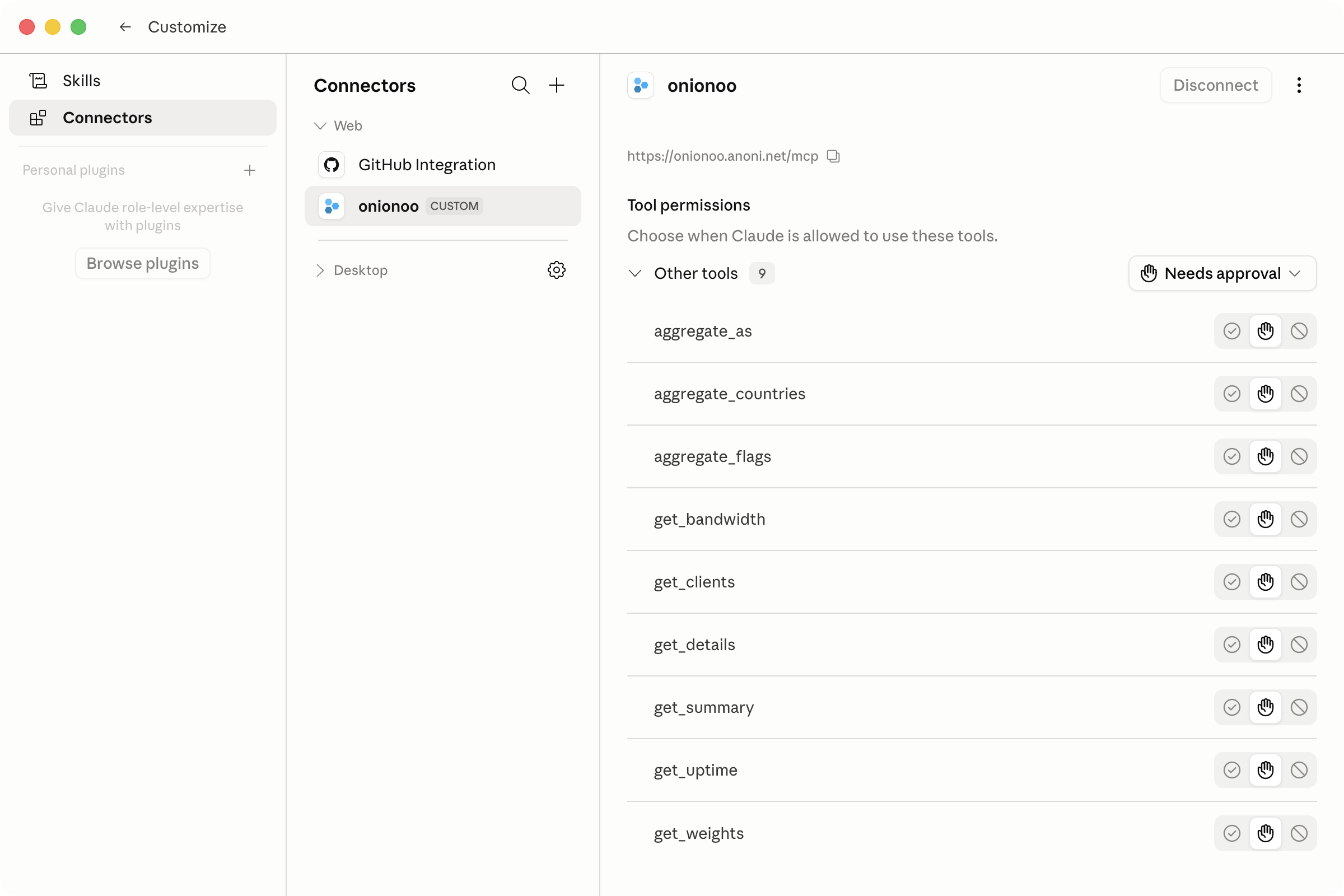
onionoo custom connector and the query tools it provides. The assistant picks the tools itself — you just ask in plain language.Questions you can copy and paste
Not sure how to phrase it? Copy one of these and swap in the country or region you care about.
Numbers you can cite (fact-checking)
How many Tor relays in Taiwan are running right now? Roughly how much total bandwidth? Summarize it as one sentence I can quote.
Cross-country comparison (reporting)
Compare the number of running Tor relays and total bandwidth in Taiwan, Hong Kong, and Japan right now, as a table.
How concentrated is it (civil society)
Which telecom networks (ASNs) host Taiwan's Tor relays? What are the top five, and how many relays does each carry?
If the answer looks useful, follow up with "When are these numbers from?" or "What's the source?" to make it spell out the provenance.
A few terms you'll run into
Don't worry if these are new — a rough sense is enough, and the assistant will explain them on request.
- Relay: a volunteer server in the Tor network that forwards traffic. There are tens of thousands worldwide; your traffic hops through several of them.
- Bridge: an unlisted relay, for people who can't reach the ordinary (publicly listed) Tor relays — for example, because they're blocked.
- Exit: the last relay on the path, where traffic leaves the Tor network and connects to the ordinary web.
- ASN (Autonomous System Number): the number that identifies a telecom or network provider on the internet. Which ASNs the relays sit in tells you which providers carry them.
- Consensus weight: the share of traffic Tor assigns each relay, roughly proportional to how much it can carry. Higher means it pulls more weight.
Are the numbers reliable — can I cite them?
Yes. The underlying data comes from the Tor Project's own Onionoo (the public metadata service for Tor relays). onionoo.anoni.net only reshapes it into a friendlier format; it stores nothing and changes no values.
- Cross-check: the same relays show up in the Tor Project's own Relay Search, and the figures should line up.
- Freshness: the service caches responses for about five minutes, and Onionoo itself updates periodically, so what you get is a point-in-time snapshot, not a live value. Note the time you queried when you cite it.
- How to cite: write it as
Source: Tor Project Onionoo (via anoni.net's onionoo service, queried 2026-06-09).
That covers everyday lookups — you can stop here. If you want to call the service from code or run your own copy, read on.
For engineers and self-hosters
The rest of this page is more technical, for calling the service from code or running your own instance. For everyday lookups, the first half is all you need.
onionoo-fastapi wraps the Onionoo API in two interfaces that are easier for tooling and AI agents to consume:
- Semantic HTTP API with OpenAPI / Swagger: Onionoo's compact field names (
n,f,a,r, and friends) are remapped to readable ones (nickname,fingerprint,addresses,running), with a full OpenAPI document on top. - Model Context Protocol (MCP) server: Claude Desktop, Cursor, Claude Code, and other MCP clients can query relays through tool calls instead of hand-rolling HTTP requests.
The service does not store any Onionoo data. It only forwards requests and reshapes responses. The upstream is https://onionoo.torproject.org.
- Hosted instance: https://onionoo.anoni.net
- Swagger UI: https://onionoo.anoni.net/docs
- MCP endpoint:
https://onionoo.anoni.net/mcp(Streamable HTTP) - Source code: https://github.com/anoni-net/onionoo-fastapi (MIT, currently v1.0.0)
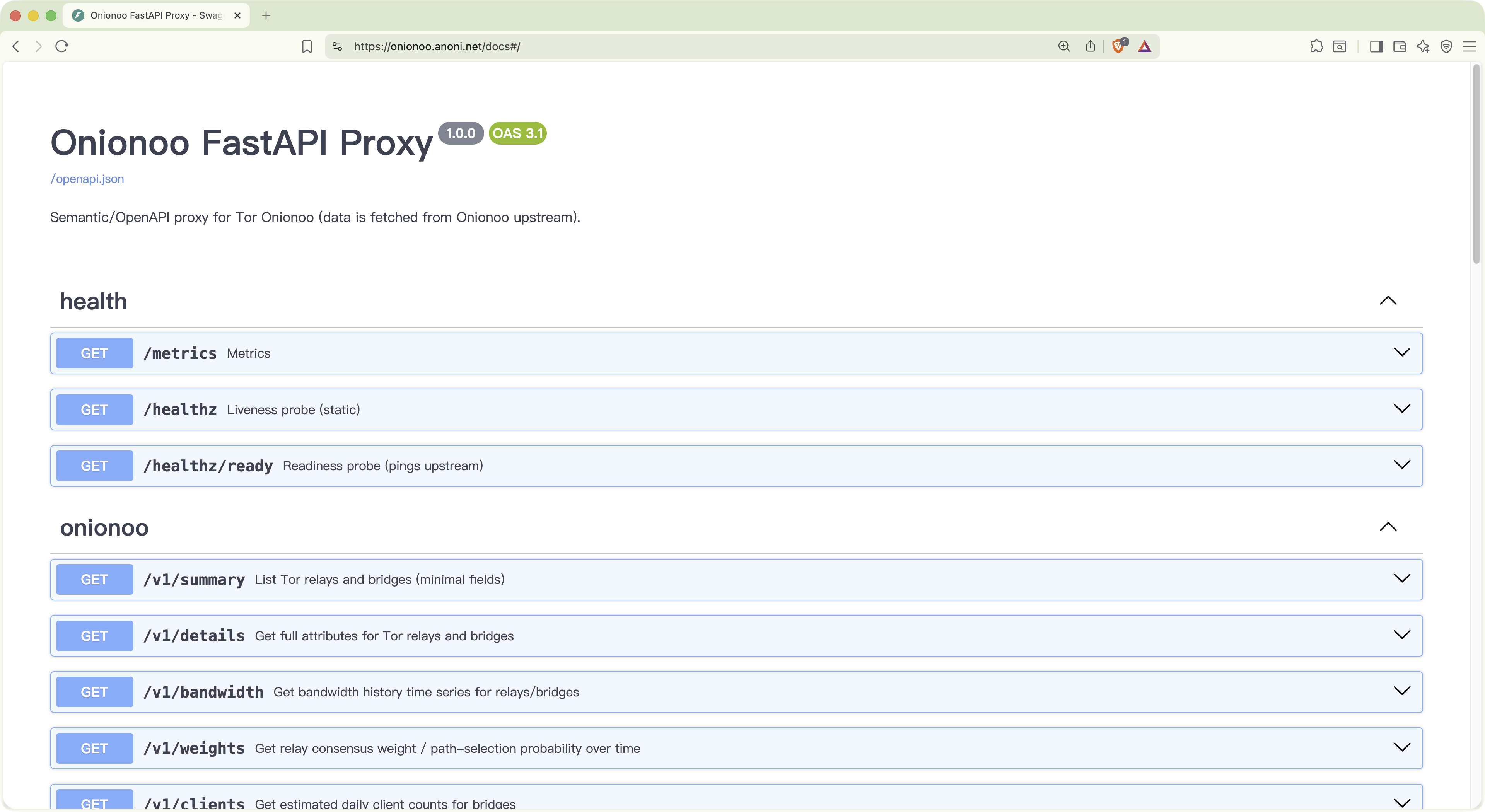
onionoo.anoni.net/docs. Every /v1/* endpoint has a full schema and a Try-it-out button for ad-hoc testing.Why this service
Onionoo's specification is solid, but it ships without an OpenAPI description, and its field names are short (optimized for transfer size). That works for a human writing a client by hand, but it is less friendly to AI agents and third-party tooling:
- No OpenAPI means tools like Swagger UI, Postman, or code generators can't introspect it.
- The short field names confuse language models — is
ra relay or justrunning? - A single question often needs several endpoints stitched together (
/details+/uptime+/bandwidth), and agents that re-derive that orchestration each time make mistakes.
onionoo-fastapi fixes all three: it ships an OpenAPI spec, exposes readable field names, and bundles common multi-endpoint tasks into single MCP tools (for example, "give me the health of this relay" is one call).
API vs MCP
An API (Application Programming Interface) is a standard way for programs to query data. Onionoo itself is an API: you send an HTTP request (for example, "give me every running relay in Taiwan") and it returns JSON. The spec is written for engineers, you get raw data back, and it works best when you already know exactly what to ask.
MCP (Model Context Protocol) is an open protocol Anthropic introduced in 2024 that defines a standard format for how AI models invoke external tools. Wrapping an existing API as an MCP server means every MCP-capable AI agent or client can connect directly; the model reads the tool list, decides when to call which tool, and you don't redo the integration each time a new client appears.
For early-stage data exploration, MCP helps a lot: you don't have to learn the dataset's schema before asking questions. The assistant does the first pass of querying and summarizing, and you decide where to dig deeper after reading its report. When some queries need repeating or wiring into a formal analysis, drop back to the API and write a script — the two paths coexist.
Wire it up as an MCP server (config file)
If your client connects via a config file (rather than the Connectors UI from the first half), add this to the mcpServers block:
{
  "mcpServers": {
    "onionoo": {
      "type": "http",
      "url": "https://onionoo.anoni.net/mcp"
    }
  }
}
Save, restart the client, and an onionoo tool group appears in the tool list.
To run it locally without depending on the hosted instance, use the stdio transport:
{
  "mcpServers": {
    "onionoo": {
      "command": "uvx",
      "args": ["--from", "git+https://github.com/anoni-net/onionoo-fastapi", "onionoo-mcp"]
    }
  }
}
You will need uv installed (brew install uv on macOS; see the official docs for Linux).
Gemini CLI also reads an mcpServers config (in its settings.json), in a similar shape — drop the same remote URL in. The consumer Gemini chat app doesn't yet have an in-app way to paste a remote MCP URL, so using it there waits on official support.
Call it as an HTTP API
Every endpoint returns semantic JSON with a _meta envelope indicating cache state:
# Details for moria1 — only return nickname and fingerprint
curl -s 'https://onionoo.anoni.net/v1/details?search=moria&fields=nickname,fingerprint' | jq .

# Taiwan's relays, sorted by consensus weight
curl -s 'https://onionoo.anoni.net/v1/details?country=tw&running=true&order=-consensus_weight&limit=5' | jq .

# Per-country aggregation of currently running relays
curl -s 'https://onionoo.anoni.net/v1/aggregate/countries?running=true' | jq .
For the full list of endpoints, parameters, and response fields, see the Swagger UI. Query parameters mirror Onionoo's protocol specification.
Self-host with Docker
If you want to run your own copy (for a .onion service, an internal network, or experimentation):
git clone https://github.com/anoni-net/onionoo-fastapi
cd onionoo-fastapi
docker compose up -d --build
It listens on port 8000 by default. OpenAPI docs are at http://localhost:8000/docs, the MCP endpoint at http://localhost:8000/mcp.
Common settings (via environment variables):
| Variable | Purpose | Default |
|---|---|---|
ONIONOO_BASE_URL |
Upstream Onionoo URL | https://onionoo.torproject.org |
CACHE_MAXSIZE / CACHE_DEFAULT_TTL_SECONDS |
In-memory cache size and TTL | 1024 / 300 s |
RATE_LIMIT_ENABLED / RATE_LIMIT_PER_MINUTE |
Per-IP rate limiting | false / 120 |
CORS_ALLOWED_ORIGINS |
Allowed CORS origins | empty (CORS off) |
LOG_FORMAT |
json or console |
json |
METRICS_ENABLED |
Expose /metrics in Prometheus format |
true |
For the full list, see the README.
MCP tools at a glance
Task-oriented tools (stdio transport, recommended for agents):
| Tool | Purpose |
|---|---|
find_relay(query) |
Free-form lookup; auto-detects whether the query is a 40-character fingerprint, an AS number, an IP, or a nickname substring |
get_relay_health(fingerprint) |
A composite health snapshot — details + uptime + bandwidth in one call |
top_relays_by_bandwidth(country?, flag?, limit) |
Top-N relays by consensus weight, optionally filtered by country or flag |
compare_relays(fingerprints) |
Fetches details for several fingerprints in parallel for side-by-side comparison |
country_summary(country) |
Running count, total bandwidth, and flag distribution for one country |
aggregate_relays(group_by, running, top) |
Server-side group-by over country / AS / flag |
Low-level pass-through (both transports):
get_summary / get_details / get_bandwidth / get_weights / get_clients / get_uptime: thin wrappers over the corresponding Onionoo endpoints. Each takes a params dict and returns the semantically renamed JSON.
The Streamable HTTP endpoint at
/mcpexposes the six low-level wrappers plus three aggregate tools (countries, as, flags); the task-oriented tools and the unifiedaggregate_relayslive on the stdio transport. The two transports can run side by side.
Example: surveying Taiwan's Tor footprint with an agent
Once onionoo MCP is wired into Claude Desktop or Claude Code, you can ask:
"Give me a summary of Taiwan's current Tor relays: how many are running, total bandwidth, top 5 ASNs, and pick out the three relays with the highest consensus weight — tell me their nicknames and which AS they're in."
The agent breaks the question into a handful of MCP tool calls and assembles a single report (over the HTTP transport that's typically aggregate_countries plus get_details; over stdio, the task-oriented tools country_summary, aggregate_relays, and top_relays_by_bandwidth are available too). Queries like this previously meant manually composing Onionoo parameters and merging JSON. Now they are a single sentence.
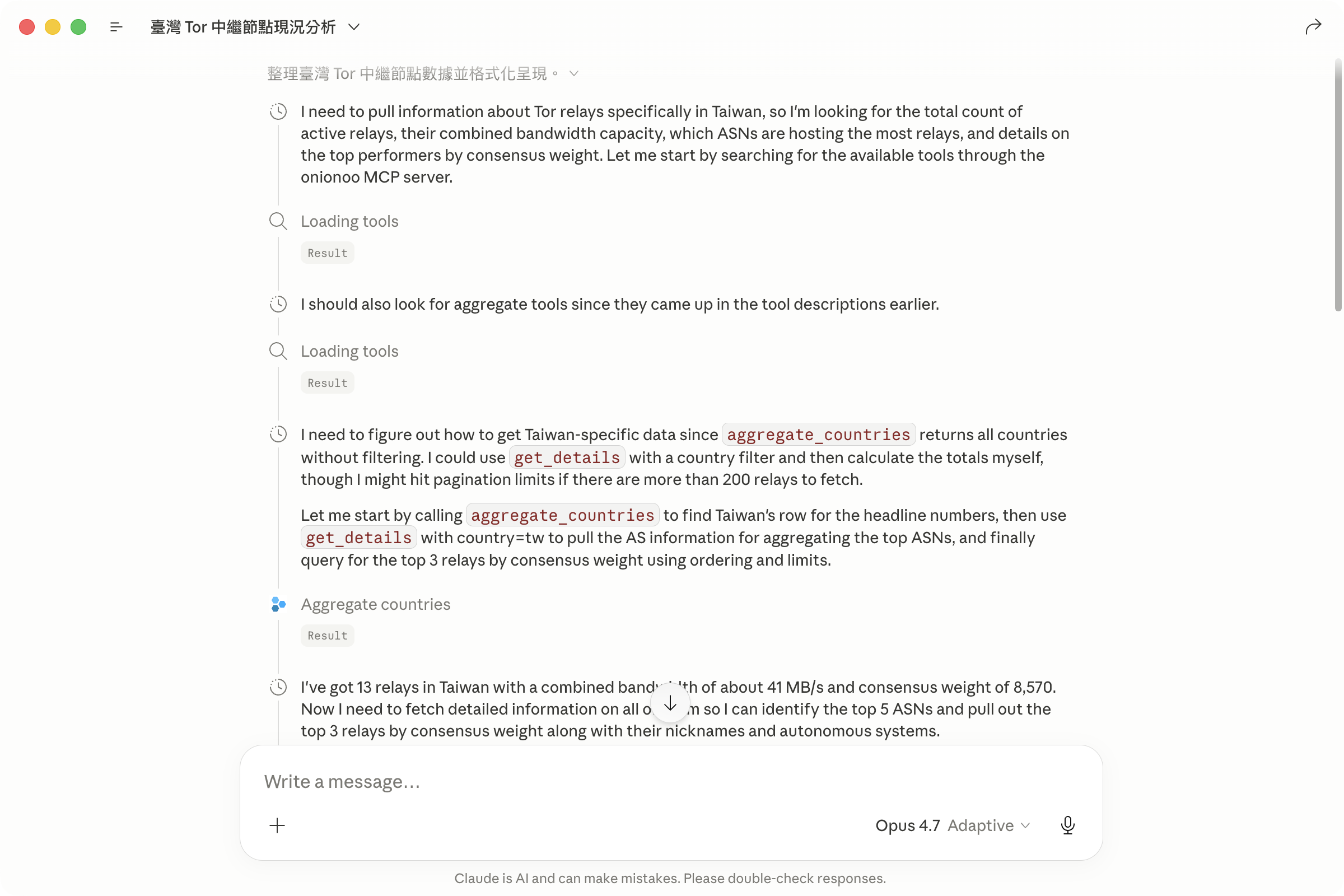
aggregate_countries and get_details tool calls inlined. The full MCP interaction is visible, which makes debugging and prompt tuning much easier.Observability and operations
/healthz: static liveness check, never hits upstream./healthz/ready: pings Onionoo (cached) — 200 if reachable, 503 otherwise./metrics: Prometheus format. Includes cache hit/miss counters (onionoo_cache_hits_totaland_misses_total), upstream latency (onionoo_upstream_seconds), and error rates.- Every request gets an
X-Request-IDechoed in the response header and bound into log records — handy for correlating issues.
Get involved
- Report bugs or suggest tools: https://github.com/anoni-net/onionoo-fastapi/issues
- Want to run your own Tor relay? See the Tor Relays Observatory for the data we publish on relays in the region.
- Pre-travel checks: Pre-departure digital safety — brief yourself with AI prompts. When a journalist or NGO needs to assess a destination's Tor reachability before a trip, connecting onionoo MCP lets the AI pull real, citable Onionoo numbers.
- Background reading: the About page covers governance and how the wider site fits together; the Regional Observatory is where this service's outputs feed back into public analysis.
Released as v1.0.0 under MIT. Issues, PRs, and Matrix discussion on which task-oriented tools to add next are all welcome.
-
Get started with custom connectors using remote MCP — Claude Help Center (custom connectors work on the Free, Pro, Max, Team, and Enterprise plans; Free is limited to one). ↩
-
Developer mode — apps and full MCP connectors in ChatGPT (beta) — OpenAI Help Center (custom MCP connectors require Developer Mode on the Plus, Pro, Business, Enterprise, or Edu plans; not available on Free). ↩
-
Set up your custom MCP server data store — Gemini Enterprise (Google Cloud). The consumer Gemini chat app does not yet offer an in-app way to connect a remote MCP server by URL; on the developer side, Gemini CLI uses an
mcpServersconfig. ↩