A browser fingerprint cannot be cleared the way a cookie can
Clear your cookies, open a private window, sign in with a different account, and a site can still recognize the machine. Nothing it relies on to do that is stored on your computer.
Every time your browser loads a page, the JavaScript on that page can ask it dozens of questions. How large is the screen, which time zone is set, which fonts are installed, which graphics card is present, which features are supported. Each individual answer is shared with a lot of other people. The combination is often shared with nobody.
Start with Cover Your Tracks if the concept is new
EFF's Cover Your Tracks tests your own browser and shows which of its signals carry the most identifying power, and Surveillance Self-Defense covers the introductory ground. We don't reproduce that work. This page is about why the problem is structurally hard, and where each major browser currently stands.
Cookies have a file, fingerprints do not
A cookie is a small piece of data a site stores in your browser. It has a file and an expiry date, and you can delete it, refuse it, or clear it on a schedule. Consent banners and the "clear browsing data" button both rest on the assumption that a user can manage it.
A fingerprint has no file behind it. It is measured and computed afresh on every page load, and closing the browser changes nothing. There is no "clear my fingerprint" action available, because nothing was stored to begin with.
Chrome's own engineering leadership described the gap in 2019. Justin Schuh, then director of Chrome engineering, wrote that unlike cookies, users cannot clear their fingerprint and therefore cannot control how their information is collected, and that "we think this subverts user choice and is wrong"1. Where the same company stands now is covered further down.
Dozens of small signals add up to one identifier
- Screen and window: resolution, color depth, window size, device pixel ratio
- System settings: time zone, language, operating system and version
- Font list: every font you have installed can be enumerated, which makes designers' and developers' machines especially distinctive
- Graphics hardware: GPU vendor and model, and the list of supported features, exposed through WebGL and WebGPU
- Canvas and audio: ask the browser to draw a shape or process an audio buffer, and small differences between hardware and drivers produce a stable hash
- The browser itself: version, which APIs it supports, which extensions are installed, how it renders text
The unit of measurement is entropy, meaning how finely a single signal divides the population. A time zone shared across East Asia puts hundreds of millions of people in the same bucket, so it carries very little on its own. A complete font list frequently narrows the field to single digits on its own.
Peter Eckersley's 2010 Panopticlick study collected 470,161 browser samples. Among them, 83.6% of fingerprints were unique, rising to 94.2% for samples with Flash or Java installed, and the distribution carried at least 18.1 bits of entropy2. Visitors to a test site select themselves, so the share of unique results runs higher than it would across the general population. Even with that caveat, a measurement from sixteen years ago is enough to establish the scale.
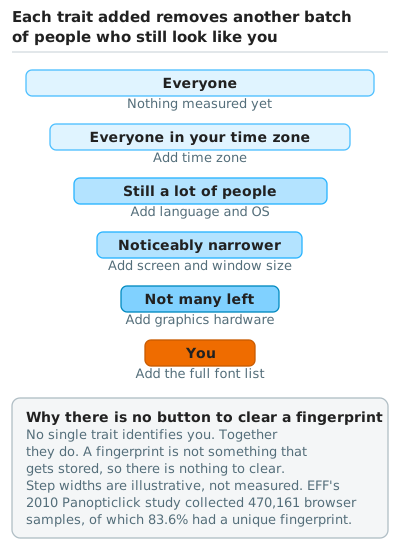
Entropy is exactly this shape. A time zone leaves you among hundreds of millions. A font list frequently cuts the field to single digits in one step. No single trait identifies you, and together they do.
Three reasons the problem resists a clean fix
Websites need the same data the trackers use
Font lists, screen dimensions, and graphics capability feed real decisions about layout and rendering. Refuse to answer any of it and some sites stop working. Usability and identifying power trade off in every defense, and where that line falls sets a ceiling on what the defense can do.
Incomplete disguises make you easier to spot
Pierre Laperdrix, writing for the Tor Project, cites what Eckersley called the Paradox of Fingerprintable Privacy Enhancing Technologies. His example is an extension that rewrites a batch of values but misses navigator.platform, producing a combination of traits that exists nowhere in reality and leaving the user easier to pick out than before3.
Trackers link fingerprints that have changed
Fingerprints shift as browsers update, screens change, and fonts get installed. A tracker does not need two readings to match exactly; closeness plus continuity in time is enough to attribute both to one machine. Vastel and colleagues collected close to 100,000 fingerprints from more than 1,900 browser instances, and half of those instances changed their fingerprint within five days. Their method still tracked a browser for 54.48 days on average, and past 100 days in some cases4.
Changing one or two signals does not reliably break the link.
Three approaches exist, and two of them point in opposite directions
Uniformity removes the entropy
Report the same value for every user and that signal's identifying power drops to zero. Tor Browser takes this route, reporting one operating system across all platforms, normalizing the time zone, and using letterboxing to pad content with grey margins so the viewport snaps to fixed dimensions rather than revealing the screen size3.
It works only if the population is large and genuinely uniform, which is what an anonymity set means. The cost lands on the user: changing settings, installing extensions, or maximizing the window all make you stand out from the crowd you depend on.
Randomization breaks the linkability
Return a different value to every site, in every session. The value still carries information, but two sites cannot line up what they received, which defeats linkability rather than entropy. Brave's farbling and Safari's noise injection both work this way.
Coverage has to be thorough for it to hold. Any signal left untouched becomes a stable anchor that undoes the randomized ones.
Limiting the answer is a third option
Refuse to answer, or answer coarsely. Firefox disables the WEBGL_debug_renderer_info extension outright when privacy.resistFingerprinting is on, and Safari reports screen dimensions matching the window and pins the screen position to (0, 0)7.
What each browser does by default, as of August 2026
| Browser | Default state | Main approach |
|---|---|---|
| Tor Browser | On in normal use | Uniformity |
| Brave | On in normal windows | Mostly randomization, uniformity for some fields |
| Safari | Two layers: script blocking on in normal browsing, noise injection limited to Private Browsing | Script blocking plus noise injection and limited reporting |
| Firefox | On in private windows and Strict mode | Script blocking plus limited reporting |
| Chrome | Off, with no built-in protection in normal windows | None |
Tor Browser pushes uniformity furthest, and the protection applies to everyone using it. The cost is a fixed window size and a slower connection, in exchange for anonymity at the connection layer that no other browser offers.
Brave has used farbling since 2020 to add slight randomization to the output of semi-identifying APIs, with a seed that differs per session and per site5. Version 1.93 brought graphics into scope, replacing the WebGL vendor and renderer strings with generic values, clearing the WebGPU adapter description fields, and adding noise to the WebGL extension list6. It is on by default in ordinary windows.
Safari protects in two layers. Advanced fingerprinting protection, shipped in 17.0, adds small amounts of noise to canvas, WebGL readback, and WebAudio; it defaults to Private Browsing only, and a setting extends it to all browsing7. Version 26.0 added fingerprinting script blocking, which stops known fingerprinting scripts from reading screen dimensions, hardware concurrency, the SpeechSynthesis voice list, Apple Pay capabilities, WebAudio readback, and 2D canvas, and from writing long-lived storage. An Apple engineer has said this layer belongs to Intelligent Tracking Prevention and is governed by the "Prevent cross-site tracking" setting, which is on by default in normal browsing8.
Firefox added a second layer in version 145. Known fingerprinting scripts are blocked through the same list that powers Enhanced Tracking Protection, and scripts not on that list are handled by limiting API output instead. Both are on by default in private windows and in Enhanced Tracking Protection's Strict mode. Users seen as unique fall by close to half, according to Mozilla's own measurement, and enabling the protections for everyone is still in progress9. A separate preference, privacy.resistFingerprinting, follows Tor Browser's uniformity approach, and it is off unless a user turns it on in about:config.
Chrome ships no fingerprinting protection in ordinary windows. IP Protection, rolling out from July 2025, applies to Incognito only, masks the IP address in third-party contexts, and explicitly does not address device fingerprinting10. Privacy Sandbox, launched in 2019 with fingerprinting named as a problem to solve, wound down in April 2025 without shipping a fingerprinting-specific mitigation11.
The same company's advertising policy moved in the opposite direction. On 18 December 2024, Google announced a change to its advertising platform policies that removed the prohibition on device fingerprinting, effective 16 February 202512. In a response published the following day, the UK Information Commissioner's Office (ICO) called the decision irresponsible and set out that advertisers deploying fingerprinting still have to demonstrate transparency, freely given consent, and respect for erasure rights under data protection law13.
Measure your own browser first
Cover Your Tracks lists what your browser reports and scores the identifying power of each signal. AmIUnique offers a second sample to compare against.
Two things help when reading the result. The sample comes from people who chose to visit a test site, so the share reported as unique is inflated. The useful part is the per-signal breakdown, because the highest-scoring fields are where a change buys you the most.
On Tor Browser, a result saying you look like everyone else is the expected one. A unique result there means something in the configuration has been altered.
Three tiers of effort do different amounts of work
Each tier notes what it leaves untouched.
Low effort
- Switch to a browser that handles this by default: Brave works out of the box, Firefox needs Enhanced Tracking Protection set to Strict, and Safari has a setting that extends the
17.0protections to all browsing - Do not stack up privacy extensions that alter fingerprint values: a disguise with gaps produces a distinctive combination and works against the goal
Any account you sign into is left untouched, because fingerprinting defenses address unnamed cross-site correlation and signing in tells the site who you are directly.
Moderate effort
- Separate purposes across different browsers: separate profiles within one browser do nothing here, because the hardware and system signals are identical across them
- Block third-party scripts with something like uBlock Origin, which reduces how many parties get to measure you at all
- Reduce what can be enumerated by removing fonts and extensions you don't need
This tier handles part of the cross-site correlation, and leaves first-party measurement by the site you are actually visiting untouched.
High effort
- Use Tor Browser and leave the settings alone, covered in Tor Browser advanced settings
- Use a separate device for sensitive work
Anything you hand over voluntarily is left untouched, since changing devices and tools changes what can be correlated rather than what a single site accumulates about you.
All three assume your jurisdiction permits the tools. Direct Tor connections are blocked in mainland China and require bridges or another entry method, and in several jurisdictions across the region the use of circumvention tools carries its own risk. Threat modeling covers how to weigh that.
Four common measures do nothing for fingerprinting
- Private or incognito windows clear local history, cookies, and sign-in state. The fingerprint is computed the same way regardless. Private windows in Safari and Firefox do carry extra protection, and the benefit comes from those protections rather than from private mode itself
- A VPN changes the IP address and leaves the fingerprint untouched, covered in VPNs, their risks and how to choose one
- Editing the User-Agent by hand usually makes you easier to identify, for the reason given above under incomplete disguises
- Clearing cookies on a schedule has no effect on fingerprinting
This page will go out of date
Browsers ship every few weeks, and defaults and feature names move with them. What is written here is the mechanism and the way to judge a claim; check the current state against each vendor's own documentation. If something no longer matches what you see, tell us in the community Matrix room.
Where to go from here
- How platforms collect your data, and the microphone question — where device fingerprinting sits in the wider tracking ecosystem
- Threat modeling — establish who you are defending against before deciding what to spend
- Maintaining multiple online identities — the limits account separation runs into when fingerprinting is in play
- Tor Browser advanced settings — the uniformity approach in practice
- What surveillance can actually do — fingerprinting placed against the four-layer capability comparison
-
Building a more private web — Justin Schuh, Google, 22 August 2019. "Unlike cookies, users cannot clear their fingerprint, and therefore cannot control how their information is collected. We think this subverts user choice and is wrong." Verified 2026-08-18. ↩
-
How Unique Is Your Web Browser? — Peter Eckersley, Electronic Frontier Foundation, PETS 2010. Source for the 470,161 samples, the 83.6% unique share, and the 18.1 bits of entropy. ↩
-
Browser Fingerprinting: An Introduction and the Challenges Ahead — Pierre Laperdrix, The Tor Project, 4 September 2019. Source for the uniformity approach and letterboxing, and for the Paradox of Fingerprintable Privacy Enhancing Technologies, which that piece credits to Eckersley, PETS 2010. The specific measures described there match the Tor Browser version current at the time of writing. ↩↩
-
FP-STALKER: Tracking Browser Fingerprint Evolutions — Vastel, Laperdrix, Rudametkin, and Rouvoy, IEEE S&P 2018. Source for the sample size, the rate of fingerprint change, and the 54.48-day average tracking duration. ↩
-
Fingerprinting defenses 2.0 — Brave privacy update 4, 2020. Source for the definition of farbling and the seed mechanism. ↩
-
Brave improves protections against GPU fingerprinting — Brave privacy update 38. Source for the three protections shipped in version
1.93. ↩ -
Private Browsing 2.0 — WebKit Blog, 16 July 2024. Source for Safari's advanced fingerprinting protection from
17.0, the scope of noise injection, and the screen-dimension normalization. ↩↩ -
WebKit Features in Safari 26.0 — WebKit Blog, 15 September 2025. Source for the list of APIs closed to known fingerprinting scripts. The attribution of that layer to Intelligent Tracking Prevention, governed by "Prevent cross-site tracking", comes from an Apple engineer's public reply, recorded in Safari 26 advanced fingerprinting protection. Verified 2026-08-18. ↩
-
Firefox expands fingerprint protections: advancing towards a more private web — The Mozilla Blog, 10 November 2025. Source for the two layers shipped in Firefox
145, the modes they are enabled in, and the near-halving of users seen as unique. ↩ -
IP Protection — GoogleChrome/ip-protection explainer. Scope limited to Incognito, masking the IP address in third-party contexts, with device fingerprinting out of scope. Verified 2026-08-18. ↩
-
Google Chrome lacks browser fingerprinting defenses — The Register, 16 April 2026. The claim that Privacy Sandbox shipped no fingerprinting mitigation is attributed there to privacy consultant Alexander Hanff; Google declined to comment. ↩
-
Google to lift fingerprinting restrictions amid privacy concerns — PPC Land, December 2024, for the 18 December 2024 announcement and the 16 February 2025 effective date. Lukasz Olejnik's analysis covers the removal of the "Google doesn't allow fingerprinting" clause. ↩
-
Our response to Google's policy change on fingerprinting — Information Commissioner's Office, 19 December 2024. ↩