What an ordinary person should actually do
The other scenarios in this section are written for people with a named adversary: journalists, activists, survivors of domestic abuse. Readers with no such role are still subject to large-scale data collection; the composition of the adversary differs, and so does the right response.
The common advice is ordered below by how much it actually blocks, and each item states what it does not block. Measures that are technically strong but rarely relevant sit lower, which is a statement about priority rather than about whether they work.
If something has already happened
An account compromised, a device lost, ongoing stalking, money already transferred — this page is not what you need right now. Go to emergency help, or contact the Access Now Digital Security Helpline (24/7, multilingual).
Do these four today
- A password manager, with a different password per site
- Two-factor authentication, as strong as the site allows
- Keep the operating system and browser updated
- Verify anything urgent through a second channel
Start with email, then online banking, then the messaging app you actually use daily. The four together take about an hour, and every tool involved has a workable free version. Why these four, and what comes after them, is below.
You can tick each one off in my preparation checklist. Ticks are encrypted with a passkey and stay on your device; nothing reaches the site. Tier one and tier two of this page are both in it.
You are facing three different adversaries
They differ in intensity, in how often they show up, and in what they cost you, so they call for different defenses.
Commercial data collection. Platforms, ad networks, and data brokers do this continuously. It isn't aimed at you personally; the goal is classification and ad delivery. The feeling that recommendations are unnervingly accurate comes from here, and the collection behind it is real. What it produces is differential treatment once you have been sorted — insurance pricing, credit limits, which job ads you see — accumulating slowly and diffusely, and tier two is where you address it. The mechanics are in how platforms collect your data.
Fraud and account takeover. Mostly automated and untargeted, occasionally aimed at a specific person. This is the one that actually costs people money. For scale: in a population of 23 million, Taiwan recorded 162,000 reported fraud cases in 2025, with losses of NT$89.3 billion (roughly US$2.8 billion)1.
Targeted investigation. An adversary with legal process or technical resources behind it. Where the rule of law holds there is a real threshold, though it is lower than most people assume. Taiwan is a useful illustration: interception requires a judge-issued warrant and is generally limited to offenses carrying a minimum sentence of three years or to an enumerated list, with time limits and reporting duties — but retrieval of communication records carries a statutory exception, and for fraud, robbery, drug, and money-laundering cases prosecutors and authorized police can obtain them without going to a court at all2. Cost and procedure still keep the target list short, so most people are not on it, but the triggers are covered in when to raise your standard.
Putting all your effort into the third adversary does nothing about the losses the second one causes, and the reverse holds too.
Where the third adversary is cheap, this ordering changes
The ranking below assumes targeted investigation is expensive and therefore rare. In mainland China, mandatory real-name registration, statutory data retention, and content moderation built into the platform layer drop that threshold sharply, and public speech alone can trigger it. Hong Kong has measured national-security sentences in years since the 2020 National Security Law and the 2024 Safeguarding National Security Ordinance, and since March 2026 refusing to surrender a device password during a national-security investigation is itself an offense. The first two tiers still apply, but the premise that "most people are not on the list" needs re-examining. See posting on mainland Chinese platforms, speaking online from Singapore and Malaysia, and the Hong Kong section of cross-border travel and device searches.
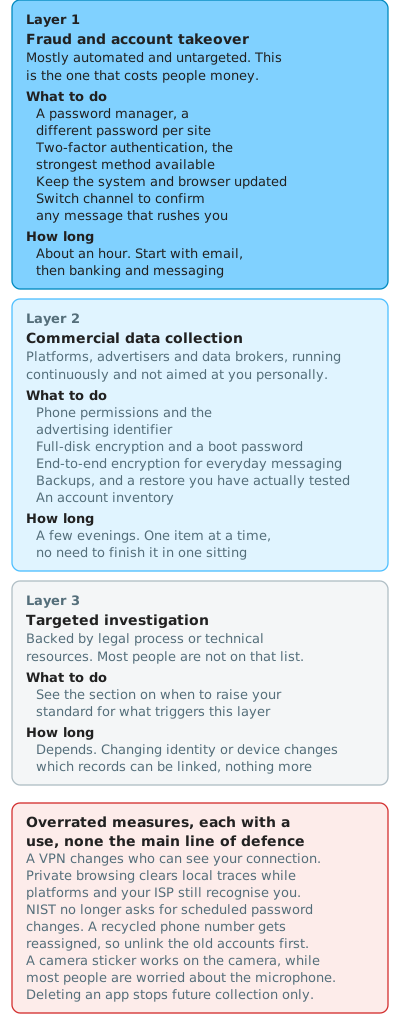
Tier one blocks most account takeover and fraud loss
These four target the second adversary, the one that actually costs money. Commercial data collection is handled from tier two onward.
Which account first: email. Every other account's password reset lands there, so losing the main mailbox means losing everything else with it. Then online banking, then the messaging and social accounts you use daily.
You do not have to process dozens of accounts today. Do email, banking, and two or three frequently used social accounts; let the password manager pick up the rest as you sign into them.
A password manager, with a different password per site
After one site is breached, attackers replay the same credentials against every other service. Unique passwords stop the chain at the first site.
Start by finding out how exposed you already are. Enter your email address at Have I Been Pwned and it lists the public breaches it appears in. The number is usually higher than people expect, and it explains directly why unique passwords rank first. The lookup does send the address to their server; the maintainer states that searches are not logged, and if that bothers you, query your least sensitive mailbox. It tells you the incident but not who sold your address on, and closing that gap means giving each service its own address; see email aliases, and who you hand your trust to.
If you have never used one, the manager built into your phone is enough to start with — the Passwords app on iOS, or Settings → Google → Autofill on Android. Choosing software can wait.
A password manager has a second, less-discussed effect: it only autofills when the domain matches. On a lookalike phishing site it stays silent, and that silence is the warning.
What it doesn't block: you copying the password out and pasting it into the fake site yourself. Tool selection and recovery planning are in getting started with password managers.
Two-factor authentication, as strong as the site allows
Two-factor authentication puts a second step after the password. Strongest to weakest:
- Passkeys — your phone or laptop's fingerprint or face unlock replaces the password, bound to the domain, with the key held by the device or your password manager
- Hardware security keys — a USB or NFC device such as a YubiKey, also bound to the domain, from US$58 at list price3
- TOTP apps — the kind that show a rotating six-digit code, such as Aegis or 2FAS
- SMS — the service texts a code to your phone number
The passkey key on this site uses the same technology for something else: acting as the key to the data you keep on your device, with no account and no sign-in. The two do not affect each other.
In practice, TOTP is what most accounts can actually be upgraded to today. Enable passkeys where they exist, and where SMS is the only option take it, since it does stop automated credential stuffing.
Where to turn it on for the first two accounts: a Google account under Account → Security → 2-Step Verification, an Apple account under Settings → your name → Sign-In & Security.
Plenty of banks and government services still offer nothing but SMS. Upgrade what you can; the rest is the provider's decision, not yours.
Where the bank's login method can't be improved, other things still can: lower the transfer limit to what you actually need, disable transfers to unregistered accounts where that option exists, and turn on a push or SMS alert for every transaction. Those set the ceiling on what a takeover costs you.
Save the recovery codes first. When you enable two-factor authentication the service issues one-time recovery codes, and they are how you get back in after losing or replacing the phone. Print them or write them on paper and put them in a drawer or a safe, rather than leaving them only on the same device. Locking yourself out is the most common thing that actually goes wrong after switching 2FA on.
Passkey coverage is worth one honest sentence. An independent census found adoption far below the impression vendor reports give, and a high share of the sites that do support passkeys get that capability by wiring in Google sign-in4. A meaningful number of "sign in with a passkey" buttons are really "sign in with Google," which concentrates the linkage into a single account rather than removing it. Enable them where they exist, and keep the password manager.
Two-factor authentication blocks direct login after a password leak. Real-time relay phishing gets past it, since the attacker forwards your code to the real site as you type it. Passkeys and hardware keys are bound to the domain and do stop that; TOTP and SMS do not.
Keep the operating system and browser updated
Most vulnerabilities that get exploited in practice already have a patch available; what attackers go after is the unpatched device. Turning on automatic updates beats remembering to check. On iOS: Settings → General → Software Update → Automatic Updates. On Android: Settings → System → System update, with wording varying by manufacturer.
Zero-days are the exception, exploited before a patch exists. They are expensive to acquire and generally reserved for specific targets.
Verify anything urgent through a second channel
The only tier-one item that is a habit rather than a setting. Urgency is the common thread across fraud: manufacture a crisis, then demand a decision while you are still reacting to it.
When a message claims to come from your bank, a courier, customer support, or a government office, don't follow the link. Open the app yourself, or call the number you already have.
The previous three stop your account being taken. This one stops you being talked into handing it over. They cover different losses and are not interchangeable.
It does not block a fake site you go looking for — a fake support page in a search engine's ad slot, for instance. Reach official channels by typing the address or using a bookmark.
Tier two is worth the time
This is where the first adversary gets addressed — the one behind recommendations that feel too accurate.
Phone permissions and the advertising identifier
Turn off the advertising ID, contact-list upload, and precise location, then walk the permission list app by app. Where to tap on iPhone, Android, and Samsung Galaxy is in phone privacy settings, step by step, about thirty minutes in numbered steps. What none of these settings stops is in how platforms collect your data.
To turn "the recommendations know too much" into something you can see, the same page's section on reading your own file points to ad-interest categories and data export. Opening your own record beats any description of the mechanism.
What it doesn't block: behavioral signals inside a platform you actively use, and the copy of you that arrives when someone else uploads their contacts.
Full-disk encryption and a boot password
Protects against someone pulling the storage out of a lost or stolen device. On iPhone, setting a passcode enables it; on Android, check Settings → Security.
It is no help when you are compelled to unlock the device in front of someone, which is a separate problem covered in cross-border travel and device searches.
Move everyday messaging to end-to-end encryption
Signal and comparable tools protect content, not the record of who contacted whom and when. Tool comparison is in comparing anonymous messaging tools; why that record often identifies you more precisely than content is in why metadata matters.
Backups
Against ransomware, drive failure, or a phone in a sink, backups are the only measure on this page that recovers anything after the fact. Keep at least two copies of anything important, with one of them not attached to the same device or the same account as the original.
Data that has already left cannot be recalled. Backups address loss, not exposure.
Take inventory of your accounts
Dormant accounts are a common leak source, and you won't notice when one is compromised. List every account from the password manager and delete the ones you don't use; deletion beats a password change. Sequencing is covered under retiring an identity in maintaining multiple online identities.
Whatever has already been taken stays taken. Deletion stops future accumulation.
Tier three is only for specific situations
With tiers one and two done, most of the everyday exposure surface is handled. What remains is behavioral profiling inside the platforms you use, their historical records, and whatever you hand over voluntarily.
- Account layering, keeping separate purposes on separate identities — see maintaining multiple online identities
- Separate devices for sensitive work
- Connection-layer anonymity with Tor — what Tor is for the basics, Tor Browser advanced settings once you are using it. Tor changes where the connection appears to come from; the account you log into is still yours
The first two overlap with the last items in how platforms collect your data, which covers them from the collection side. What differs here is the reason to reach for them, and that is what when to raise your standard covers.
None of it touches what you hand over yourself. Changing identity or device changes whether records can be joined; it does not reduce what any one side sees.
Overrated measures
Each of these has a clear use. They are just frequently mistaken for the main line of defense.
| Measure | What it actually does |
|---|---|
| VPN | Changes who can see your connection. Selection criteria and the ownership problem are in VPN risks and how to choose one |
| Private browsing mode | Clears local history. The platform, your ISP, and any service you log into still recognize you |
| Rotating passwords on a schedule | NIST's digital identity guidelines now state that verifiers must not require periodic rotation, only a change when there is evidence of compromise. Forced rotation usually produces Summer2025! becoming Summer2026!5 |
| Changing your phone number | Carriers recycle released numbers to the next customer, so unbind accounts from the old number first |
| Camera cover | Effective for the camera, but what most people worry about is the microphone. The evidence on that is in how platforms collect your data |
| Deleting an app | Stops future collection; data already held does not disappear. To actually reduce it, export your data to see what exists, then go through account deletion |
A yearly review
Not a redo. Just work through these questions once a year. Items ticked in my preparation checklist carry the date you ticked them, so start with the ones that have sat the longest. The nine questions below are in the checklist too, under the yearly review group.
- Any reused passwords left in the manager? Most tools check this for you
- Any important accounts still on SMS that now support something stronger?
- Can you still find your recovery codes, especially after changing phones?
- Delete anything you haven't signed into in a year
- Any devices you don't recognize in the active-session list of your messaging and social accounts?
- Who can still see your location sharing? Family sharing, calendars, and shared albums all count
- Review the phone permission list, especially for recently installed apps
- Can you actually restore from your backup? An untested backup is not a backup
- After a job change, a relationship change, or a move: do the assumptions above still hold?
Local equivalents
The figures cited here are Taiwanese because that is where this site is based. The categories transfer; the specific institutions do not. Wherever you are, it is worth knowing three things before you need them.
- The national fraud reporting line and its published statistics: Taiwan's is
165, and its public dashboard breaks down case counts and losses by fraud type, which is a fast way to see what is currently common. Many jurisdictions publish something comparable - Your data protection authority, and whether it can actually act on a complaint
- How fast your bank can freeze a transfer: When money has already moved, call the fraud line and the bank at the same time with the transfer time and the receiving account. That interval decides whether anything is recoverable
When to raise your standard
The baseline above assumes no specific adversary. When one of the following becomes true, the threat model has changed and the corresponding page applies.
| Situation | Where to go |
|---|---|
| You start working on sensitive material, or someone offers you internal information | journalists and source protection |
| You join organized action or attend protests | activists and protest digital safety |
| A partner or family member monitors your devices and location | domestic violence and tech-enabled abuse (outline; full text in progress) |
| You need to control the pace of disclosure, or use the internet under family monitoring | LGBTQ+ and sexual minorities |
| You are observing an election or recording at a polling station | election observer self-protection (outline; full text in progress) |
| You want to donate anonymously, or design a donation channel for an organization | anonymous donation channels |
| You are traveling to a jurisdiction with border device searches | cross-border travel and device searches in Asia, pre-departure briefing prompts |
| You plan to post publicly where the state polices online speech | posting on mainland Chinese platforms, speaking online from Singapore and Malaysia |
Where to go from here
- Threat modeling — what to protect, from whom, at what cost; the basis for the ordering on this page
- How platforms collect your data — the full version of the commercial-collection thread
- What surveillance can actually do — capability limits for the commercial-collection and targeted-investigation adversaries above, plus telecom retention and commercial spyware
- Phone privacy settings, step by step — the tier-two phone settings as numbered steps to follow on your own phone
- Why metadata matters — why encrypting content still leaves a great deal behind
- Maintaining multiple online identities — account layering and retiring an identity
- My preparation checklist — this page's items as a list you can tick off, encrypted with a passkey and kept on your device
- EFF Surveillance Self-Defense — the canonical general-audience guide, available in 14 languages
- Access Now Digital Security Helpline — 24/7 multilingual support when something has already gone wrong
-
Figures from Taiwan's National Police Agency 165 anti-fraud dashboard: 162,000 cases and NT$89.326 billion in losses for calendar year 2025. Press summary: Nationwide fraud losses approached NT$90 billion in 2025 — TTV News, 19 January 2026. Verified 2026-08. ↩
-
Communication Security and Surveillance Act, Article 11-1 (Taiwan). Prosecutors must normally apply in writing to the court for a retrieval order, but paragraph 4 carves out offenses carrying a minimum sentence of ten years, along with an enumerated list including robbery, snatching, fraud, extortion, kidnapping for ransom, narcotics, and money laundering, for which a prosecutor or an authorized judicial police officer may retrieve records directly. The interception threshold is in Article 5. Verified 2026-08. ↩
-
The YubiKey 5 NFC lists at US$58; other models in the series are priced differently. Verified 2026-08. ↩
-
Census of passkey support across the Tranco top 100K, based on a March 2025 snapshot: 11.3% overall, 20% among the top 100, and 6.9% at ranks 50K–100K. The paper reports both "External IdPs (transitive passkey support via OAuth) detected 75.2%" and "75.2% of all passkey-supporting sites integrate Google SSO," so this page says "a high share" rather than committing to one reading. See State of Passkey Authentication in the Wild: A Census of the Top 100K sites. Verified 2026-08. ↩
-
NIST SP 800-63B, Digital Identity Guidelines. Revision 4 was finalized on 31 July 2025, superseding the 2020 revision; the August 2024 document was the second public draft. It states that verifiers
SHALL NOT require periodic rotation, requiring a change only on evidence of compromise. Verified 2026-08. ↩