Announcing Vessel, a community VPN
On this page
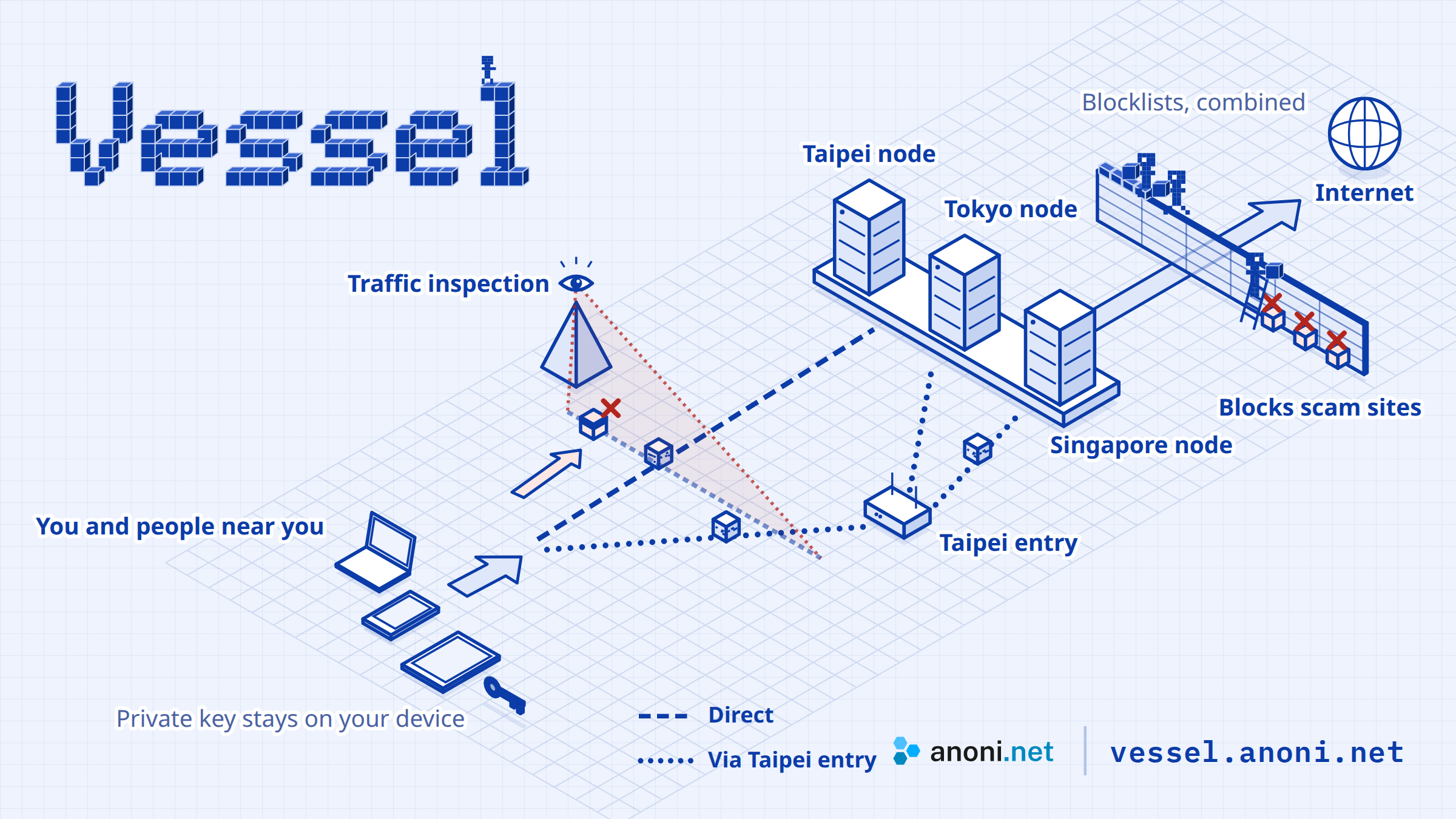
At school, in a hotel or abroad, the VPN you usually rely on may not connect, and when something goes wrong it is hard to find someone to ask. Vessel is a VPN the anoni.net community runs for the people around it. Its connections are disguised, which makes them easier to establish on networks that block VPNs. It needs no email address or payment, and when you have a problem, someone answers.
Getting an invite code
Vessel is invite-only for now and is opening in rounds. Invite codes go to newsletter subscribers, so please subscribe to the newsletter. You can also write to [email protected], or tell us on the feedback page and leave a way to reach you, saying what you need.
Since we sent the first invite codes on October 28, we have adjusted the service to how people use it, and it now moves from a closed beta to open by invitation. There is now a Taipei node and a relay route through a Taipei entry, which gives you another path when a direct connection is unstable, and DNS filtering now covers Taiwan's lists of scam sites.
Built and run as a product
Vessel is a service we intend to run for the long term, so we design, adjust and operate it to a product's standard, and we will keep developing it. When we make a decision, we start from what people actually run into when they connect: whether it connects, whether the steps are simple, and whether someone deals with a problem when it comes up.
The nodes are spread across Taipei, Tokyo and Singapore with different hosting providers, so if the network in one city is blocked or one provider has trouble, there are other routes to choose. When a direct connection is unstable you can take a relay route, and we will add cities based on how the service is used and on your feedback.
Beyond the VPN itself, we keep developing added features for the people using it, at no extra cost. The first is DNS filtering with its protective blocklists: we compare how much each public list covers, fill the gaps, and adjust as new sources and your reports come in.
Day-to-day operations follow the same standard. A new feature has to be something a non-technical person can complete by following the steps, and every change is checked on desktop and phone and run through automated tests. The state of the service is public on the service status page, we keep checking the disguise and the signs that nodes are being probed, and someone reads and acts on your feedback.
Nodes in Taipei, Tokyo and Singapore
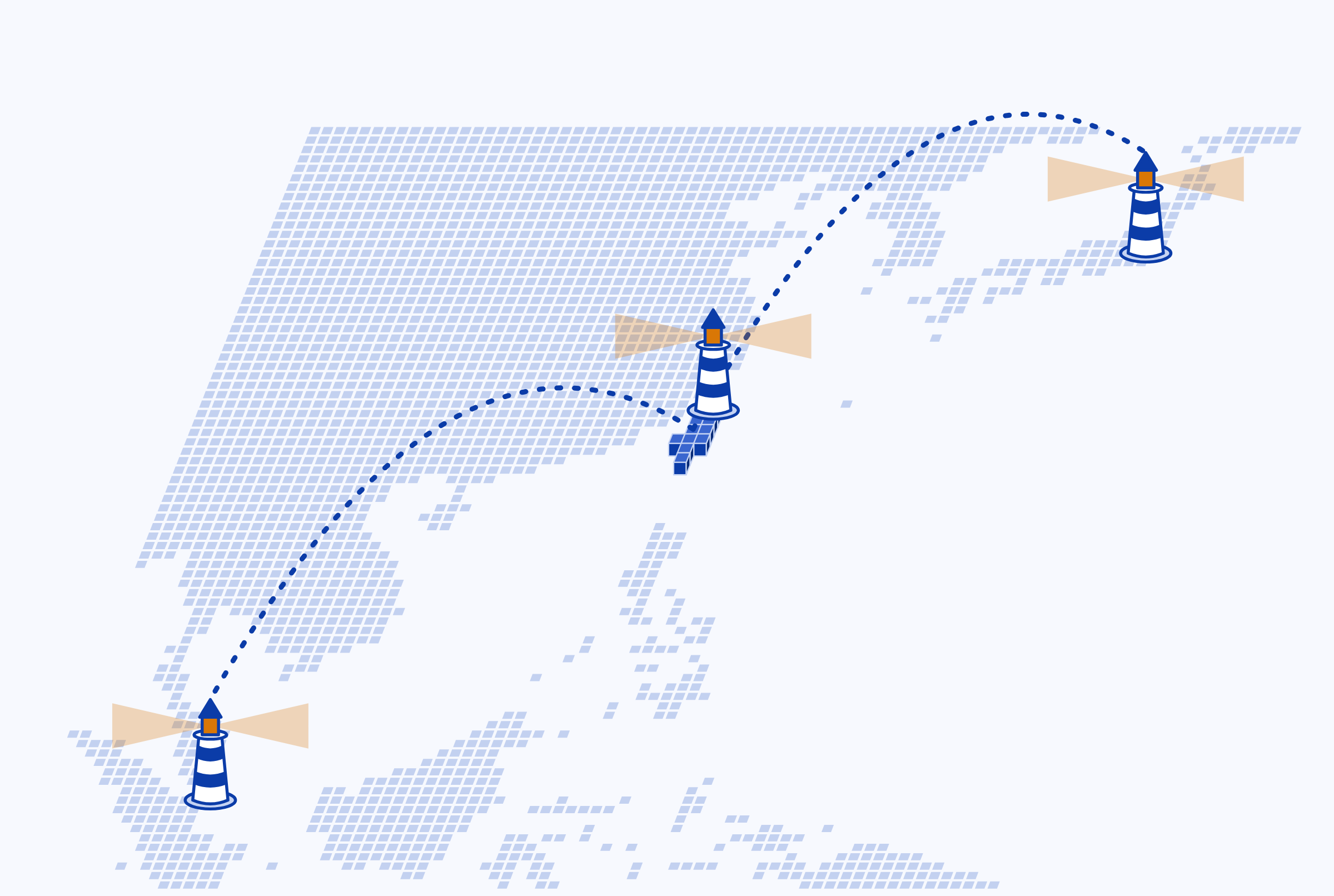
A node is the server your connection passes through before it reaches the Internet. You choose a city when you create a device; to change cities, add a new device. The Taipei node is hosted in Greenhost's Taipei data centre. From a Chunghwa Telecom line in Taiwan the latency is about 2 milliseconds, compared with 35 to 67 milliseconds to Tokyo or Singapore. Its bandwidth is smaller, so it suits everyday browsing; for large downloads, pick Tokyo or Singapore.
We had looked for a suitable host in Taiwan for some time, and a community-run service does not easily find a host willing to support it. When we wrote to Greenhost, they agreed to let us try it and helped open their Taipei data centre. Thank you, Greenhost.
A relay route through the Taipei entry
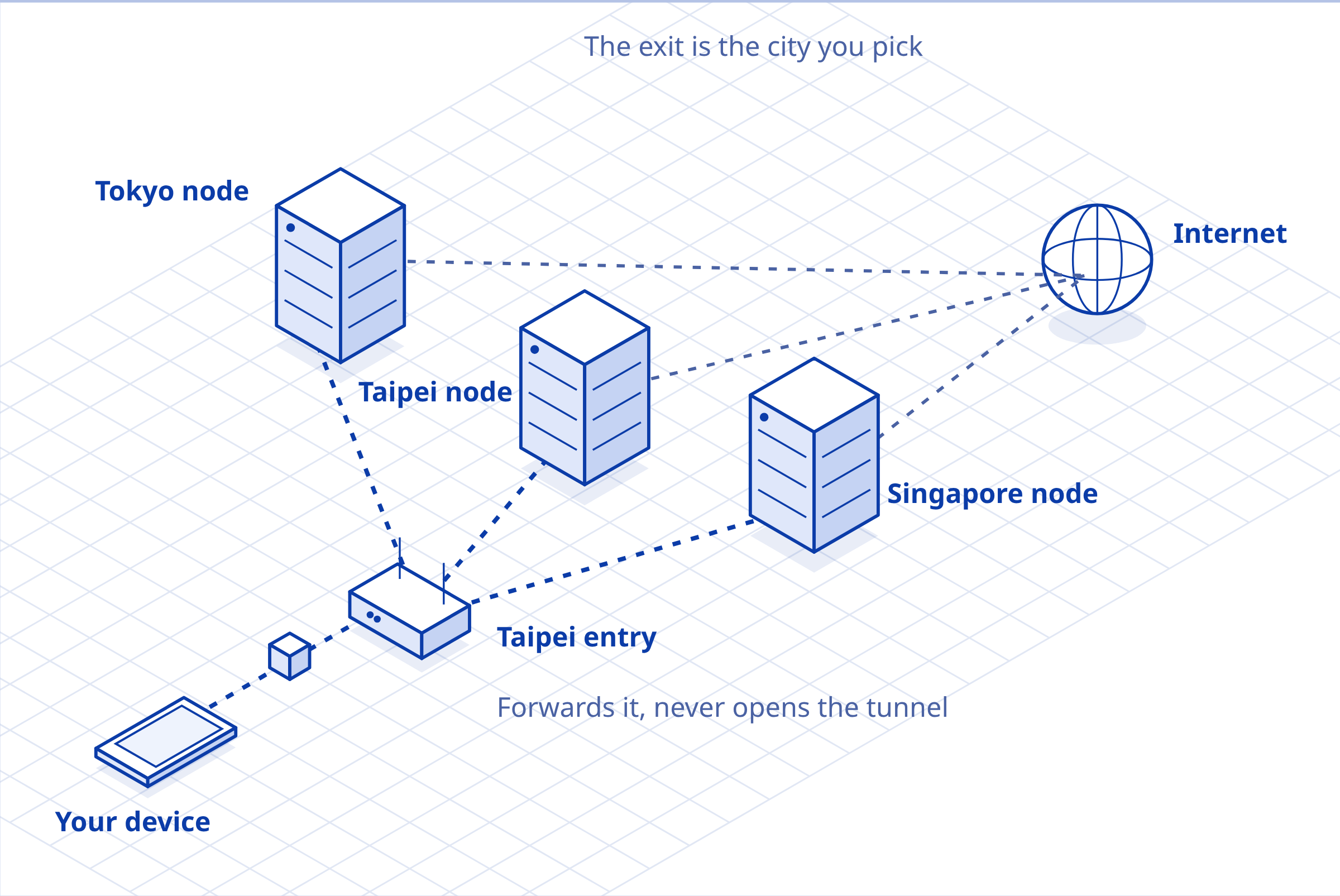
A relay route splits your connection in two, an arrangement close to Apple's iCloud Private Relay. It goes to an entry in Taipei first and is forwarded as it is to the node you chose. The entry knows your IP address, but the packets are encrypted, so it cannot see where you go, and it only counts the traffic that passes through. The node reaches the site for you, so it knows where you go, but the source it sees is the entry, not your IP address. The difference is that Apple's two parts belong to separate companies, while the community runs both the entry and the nodes of Vessel.
Your network provider sees only that you connect to the entry, and not which node you actually use. When connecting straight to a node is unstable or fails, you can take a relay route instead.
When you add a device, choose "Taipei entry → Tokyo", "Taipei entry → Singapore" or "Taipei entry → Taipei" under the cities; the exit is the node's city. To switch to a relay route, add a new device.
DNS filtering and Taiwan's scam-site lists
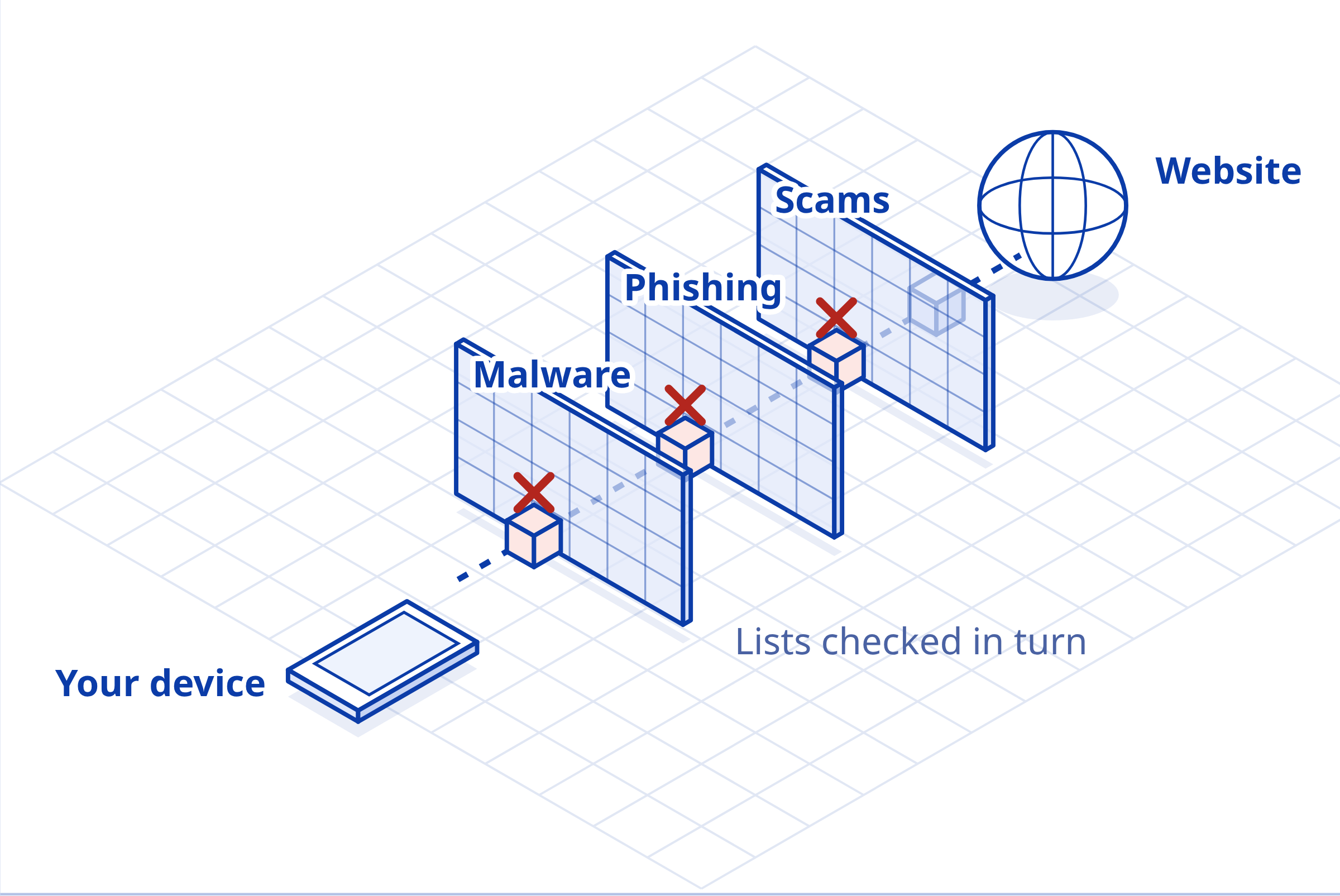
You can turn on DNS filtering when you add a device. Before a device connects to a site, it asks the DNS resolver on the node (the service that turns domain names into IP addresses), and malicious sites on the lists are stopped there. We combine several public blocklists, each covering a different kind of threat:
- Malware and phishing: HaGeZi's Threat Intelligence Feeds, updated every 8 hours
- Scam sites in Taiwan: the domains Taiwan's 165 anti-fraud hotline has taken offline, and the scam shopping sites Taiwan's Administration for Digital Industries has taken offline
- Ads and trackers: with the ad filter, HaGeZi Multi PRO as well, updated daily
HaGeZi's sources are mostly in Europe and North America. On October 31 we checked the 86,000 scam domains on Taiwan's 165 list against HaGeZi, which covered 0.2% of them, so we added that list first. We then went through other public sources: of the 1,734 scam shopping domains from Taiwan's Administration for Digital Industries, about 15% were neither on our lists nor offline, so we added that list as well. Next we will look at the public warning lists of other Chinese-speaking regions.
Of 149 domains sampled from September, the DNS of Chunghwa Telecom, Taiwan's largest provider, answered every one with its block page, while Cloudflare's 1.1.1.1 resolved 103 to live sites. Wherever you connect to Vessel from, your lookups go to the node's resolver, and any DNS blocking by your local provider no longer applies.
To change the filter on an existing device, delete the device and create it again. The DNS filtering page lets you check whether a site is on the lists.
Privacy and security by design
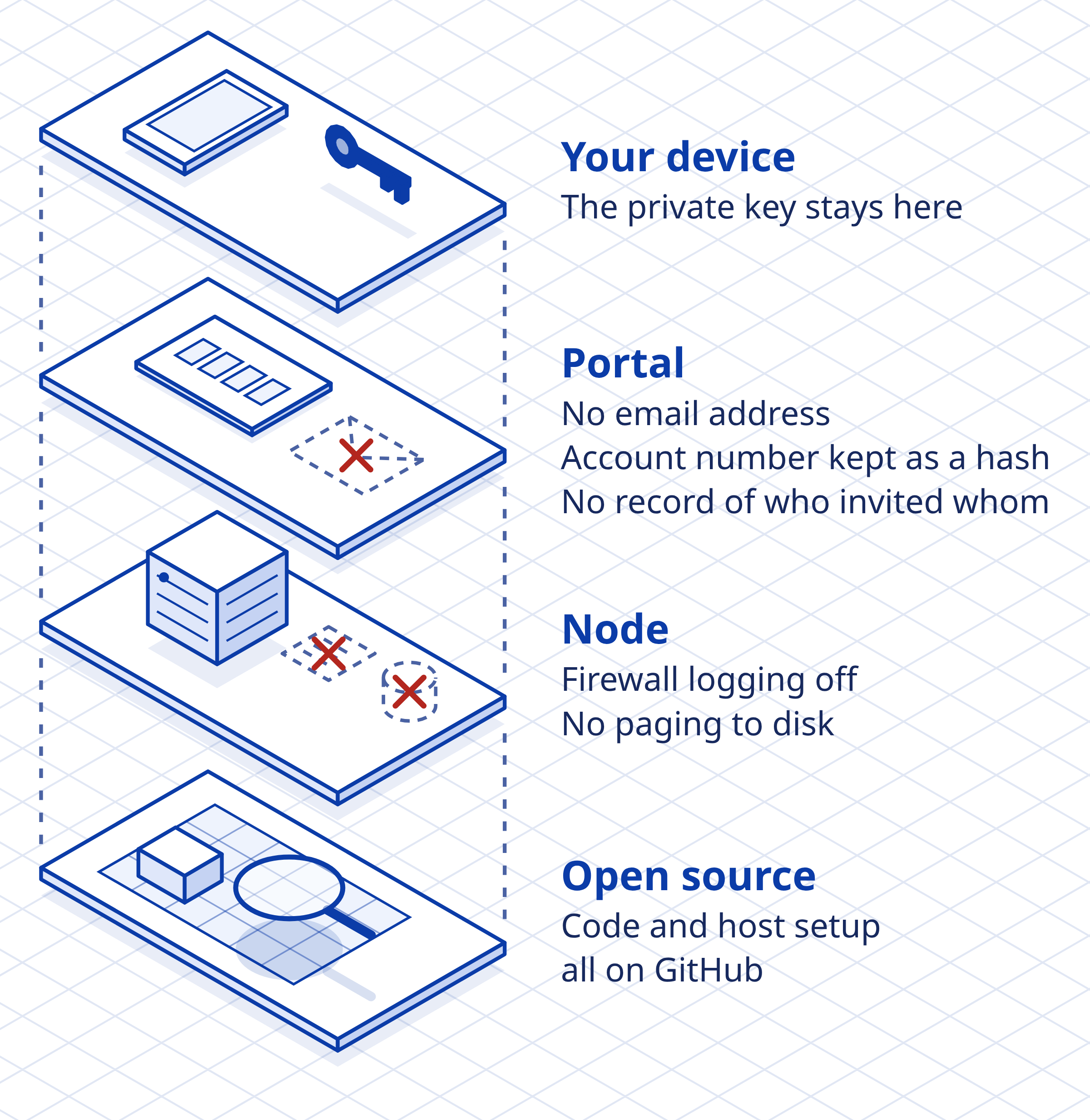
Vessel was designed around privacy and security from the start. The private key for your connection (a key that stays on your device) is made in your browser, accounts need no email address, account numbers are stored only as hashes (one-way values that cannot be turned back into the number), and once an invite code is redeemed nothing records who invited whom. Since launch we have kept at it, for example by turning off the nodes' firewall logs and keeping memory swap off the disk, to cut down the connection details that could end up on a node's disk.
The code for Vessel's site and the nodes' host setup is all public on GitHub. You are welcome to look through it and check it, and to open an issue or send a pull request when you find a problem or have a better fix or a feature in mind.
A blueprint-style site
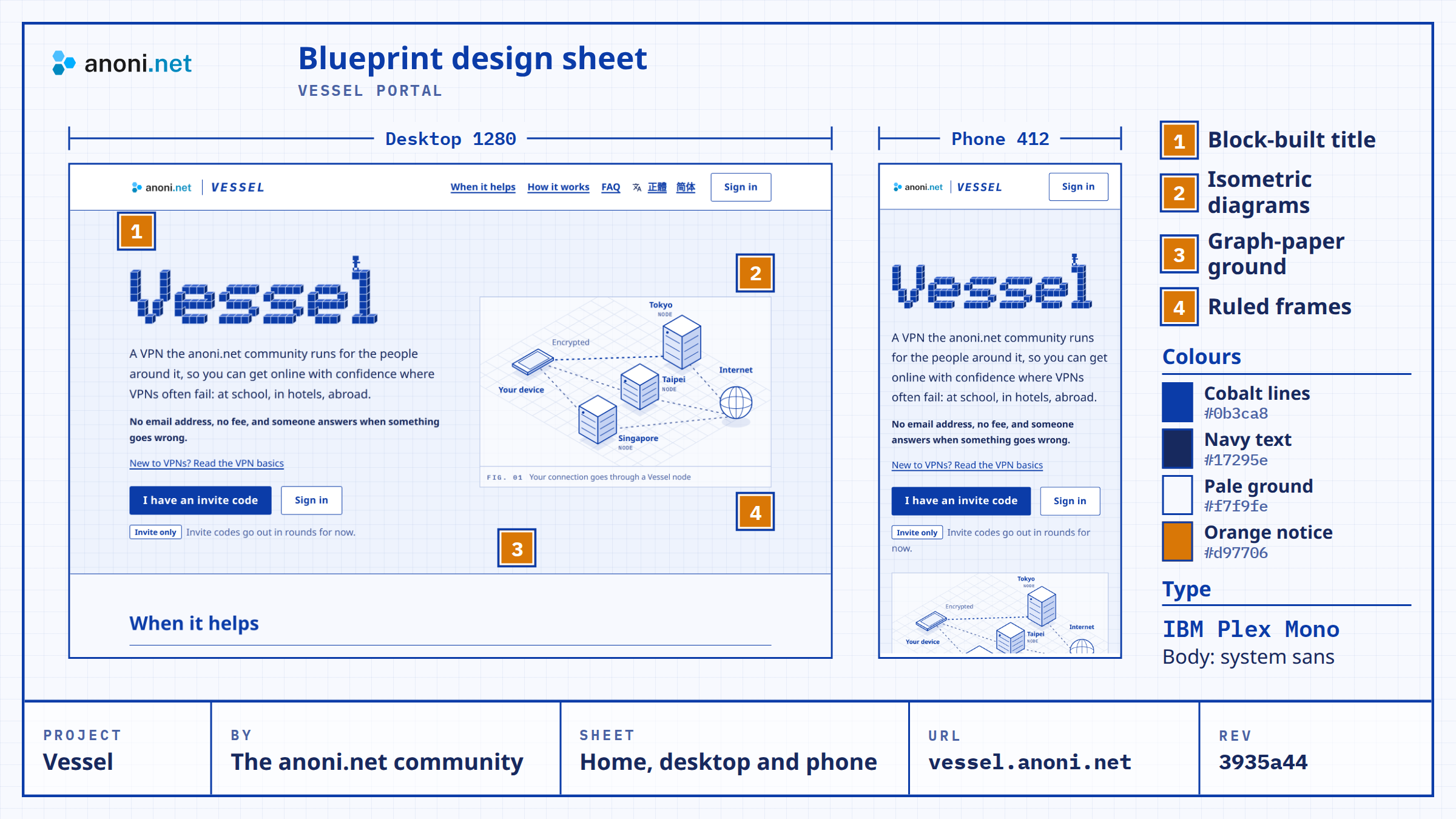
Vessel's site looks like an engineering blueprint: cobalt lines on graph paper, and a title built from blocks that spell Vessel.
A vessel is a ship, and before a ship is built someone draws its plans. Every part and its size is marked on them, and those plans are what you check it against. VPN sites tend to show shields and padlocks, and you still cannot see how anything works. We would like you to trust what we actually do, so we drew the site as a set of plans laid open. The nodes a connection goes through, how the blocklists are checked and where the keys are made are all on the home page.
A vessel is also a container: your connection is packed into an encrypted tunnel before it sets out, so the network providers along the way see only the disguised outer packets and cannot get at what is inside. The packets are unpacked at the node and sent on to the site, and the node does not write the destination or time of a connection to any log.
The community's servers and bandwidth have a fixed capacity, as a container does, so each account has 50 GB a month and invite codes go out in rounds depending on how the service is being used. We would like to look after what fits, with someone there to answer when you have a problem, before adding more nodes and places.
The block title on the home page follows the same idea: a small pixel figure carries a cobalt packet across the letters and presses it into the final l, and the word slowly fills from the bottom up.
What to know before you use it
Vessel does not provide anonymity. The domains and IP addresses you connect to pass through the node, so use Tor Browser when you need anonymity. Volunteers run the service, and it may be interrupted. The disguise lowers the chance of being blocked, but it cannot promise to connect on every network (see the terms of use).
Some places restrict or ban unapproved VPNs, and using Vessel there can carry a penalty. Your local network provider can still see your device connecting to an IP address abroad. If your situation is sensitive, read the FAQ answer Is Vessel safe to use where VPNs are restricted? and the docs page on device minimization and border crossings in Asia before deciding to use it.
The terms of use and privacy policy are still drafts. Before the final versions take effect, we will announce them on Vessel's site and in the anoni.net newsletter.
Sharing invite codes, and feedback
If you know our community and agree with running a service this way, in the open, please share Vessel with the people around you who need it. Once your account is 14 days old and one of its devices has connected, the Invite friends section of the Account page can make an invite code. Give it to someone you know and trust, and please do not post it publicly. The code works for 7 days and makes one account.
If something goes wrong, your connection is unstable, or you would like a node in another city, tell us on the feedback page, or reach us here:
- Real-time discussion: Matrix public room (home server
im.anoni.net, link on the services page) - Anonymous tips: [email protected] (GPG key)