Gears File Workbench and Its Local-Processing Design
On this page
- Why a separate product
- After dropping "the page makes no connections"
- The page's CSP
- Outbound requests from the transcript Worker
- New outbound connections in dependencies
- A link checker that never sends the link
- Cloudflare's injection and compression
- Usage analytics
- Random data in Tor Browser
- Current outbound connections
- What is not done yet
- Related reading
A photo taken on a phone usually records the latitude and longitude where it was taken, the phone model and the time down to the second. A chat screenshot shows the other person's name and avatar, and a Word file records its author, the company name and sometimes a folder path on the computer. None of this matters day to day, but once the file goes to a journalist, onto the internet or to someone you don't fully trust, it can identify the person who provided it.
Plenty of online services remove these details, and nearly all of them need the file uploaded first. Handing a photo to an unknown server in order to protect it gets the order backwards. The Gears File Workbench moves metadata removal, redaction and encryption into the reader's browser, and by default the file never leaves the device.
Why a separate product
Gears grew out of the docs site's tools section. Once bot traffic is removed, the tools section is the most used part of the docs site after its home page, and the most used tools are metadata removal, redaction, the passphrase generator, QR codes and link cleaning. Most of the people using them are general Traditional Chinese readers whose needs have little to do with Tor.
The docs site's tools follow three rules: they work offline, the pages make no network connections, and there is no build step. Those rules keep the docs site usable where the network is cut, and they also cap how far the tools can go. Face detection was limited to a 240 KB lightweight detector that often missed small faces in group photos, and metadata removal could not read HEIC, the iPhone's default photo format. Readers arriving from search engines almost never wandered into the tools section either, so the tools existed but the people who needed them couldn't find them.
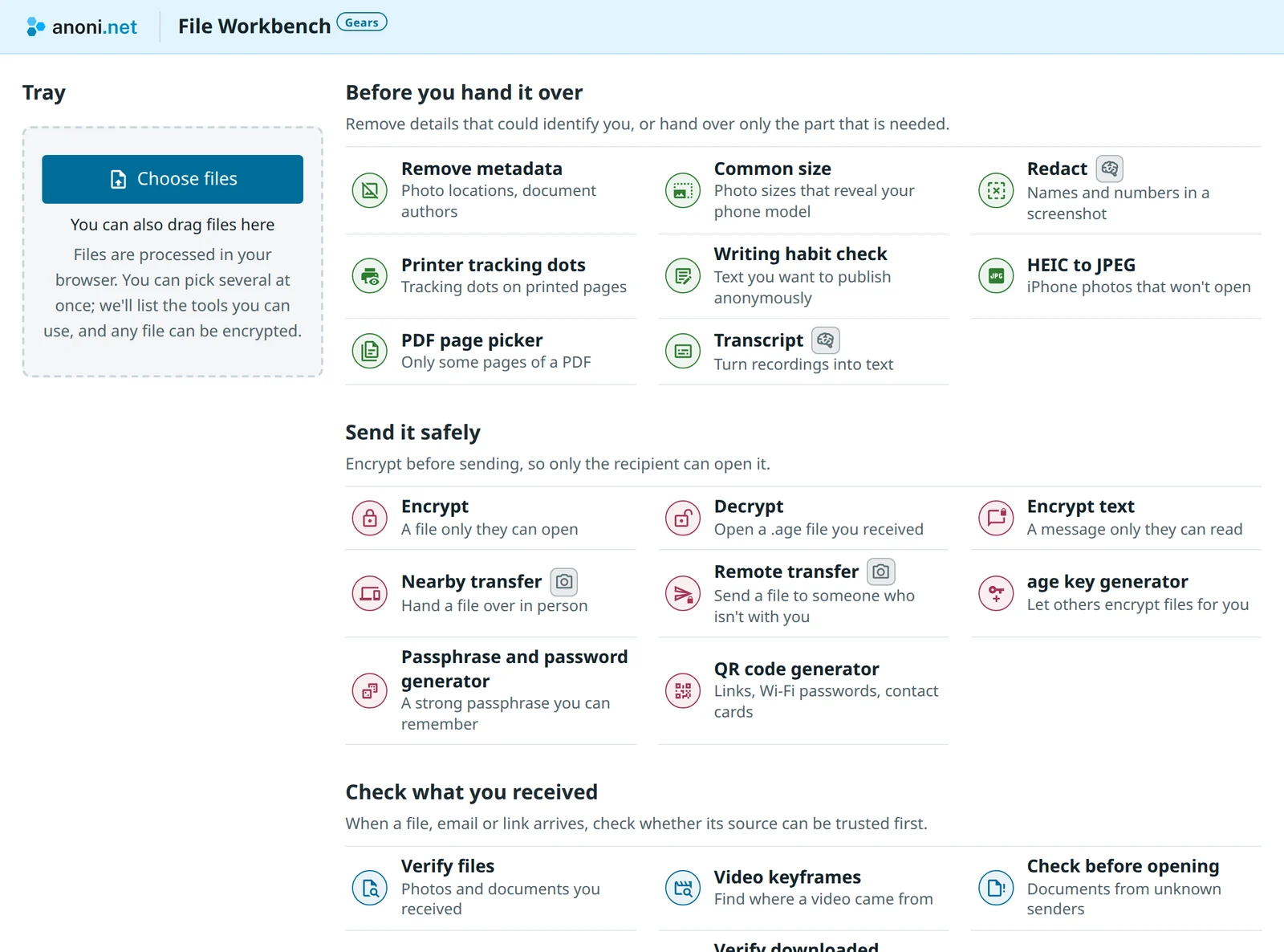
On 2026-10-14 we decided to grow the tools into a separate product and leave the docs site's tools as they are. Gears can use npm packages, a bundler and models of several hundred megabytes, which buys features the docs site cannot offer: HEIC metadata removal, PDF redaction, transcripts of recordings and verification of files you receive. The desk groups tools by what the reader is trying to do, before you hand it over, send it safely and check what you received, and every tool shares one tray that lives only in memory and is cleared when the tab closes. The first version went live two days later with transcripts and verification already in it, and remote transfer followed on 10-20.
After dropping "the page makes no connections"
The docs site's tools could lean on the rule that the page makes no connections: readers did not need to trust us to know their files would not be sent anywhere. Gears dropped that rule. Its npm packages hold tens of thousands of lines of code we did not write, the large transcription model downloads from Hugging Face, and remote transfer goes through the community's server. Each addition widened the part of "your files are not sent anywhere" that readers could only take on our word.
Gears keeps the same promise another way. Where the page can connect is fixed in a place readers can check for themselves, every feature that goes online states what it sends and who can see it, and what we cannot do yet is written down. What follows is how that works, and three mistakes we made in the first two weeks of development.
The page's CSP
A CSP (Content Security Policy) is a set of rules a site hands to the browser, listing where a page may load code from and where it may connect to; the browser blocks any request outside those rules. Every Gears page carries a meta tag in its <head>. The clearnet version reads as follows, with the two submission URLs replaced by descriptions:
default-src 'none'; script-src 'self' 'wasm-unsafe-eval'; style-src 'self';
img-src 'self' blob: data:; media-src blob:;
connect-src 'self' <analytics submission URL> <feedback submission URL>;
worker-src 'self' blob:; font-src 'self'; manifest-src 'self';
base-uri 'none'; form-action 'none'
The line that matters is connect-src. Even if a dependency were compromised, fetch, XMLHttpRequest and WebSocket could reach only our own domain and the two submission URLs, so a reader's files would have nowhere to go. The rule sits in the page source, so anyone can check it with "View page source" instead of taking our word for it. wasm-unsafe-eval is there for the WebAssembly used by the HEIC decoder and the recognition models; it allows compiling WebAssembly and nothing more, and JavaScript's eval stays blocked.
The rules are generated by policy() in vite.config.ts. Any new outbound connection has to be added there and marked in the interface, which makes it easy to spot in code review.
Outbound requests from the transcript Worker
The first mistake was in the transcript tool. Recognition runs in a Web Worker so the interface does not freeze during transcription. A Worker loaded from a URL applies the CSP from its own script's response headers, and the rules in the page's meta tag do not reach it.
When transcripts were added on 2026-10-15, Transformers.js brought its own copy of onnxruntime-web, which by default downloads its WebAssembly from the jsDelivr CDN. At that point the only CSP was the meta tag, the Worker was unrestricted, and those requests really went out. The fix was to import that WebAssembly with Vite's ?url so it loads from our own domain, and to have nginx send the CSP as a header as well, which brings the Worker under the same rules. When a page has both a header and a meta tag, a request has to satisfy both, so the page itself can still reach only what the meta tag lists.
Browser tests now guard against the same mistake. tests/e2e/guard.ts records every request and console error from the page during each test, and any request to somewhere other than the test server, or any console error left by a CSP block, fails the test.
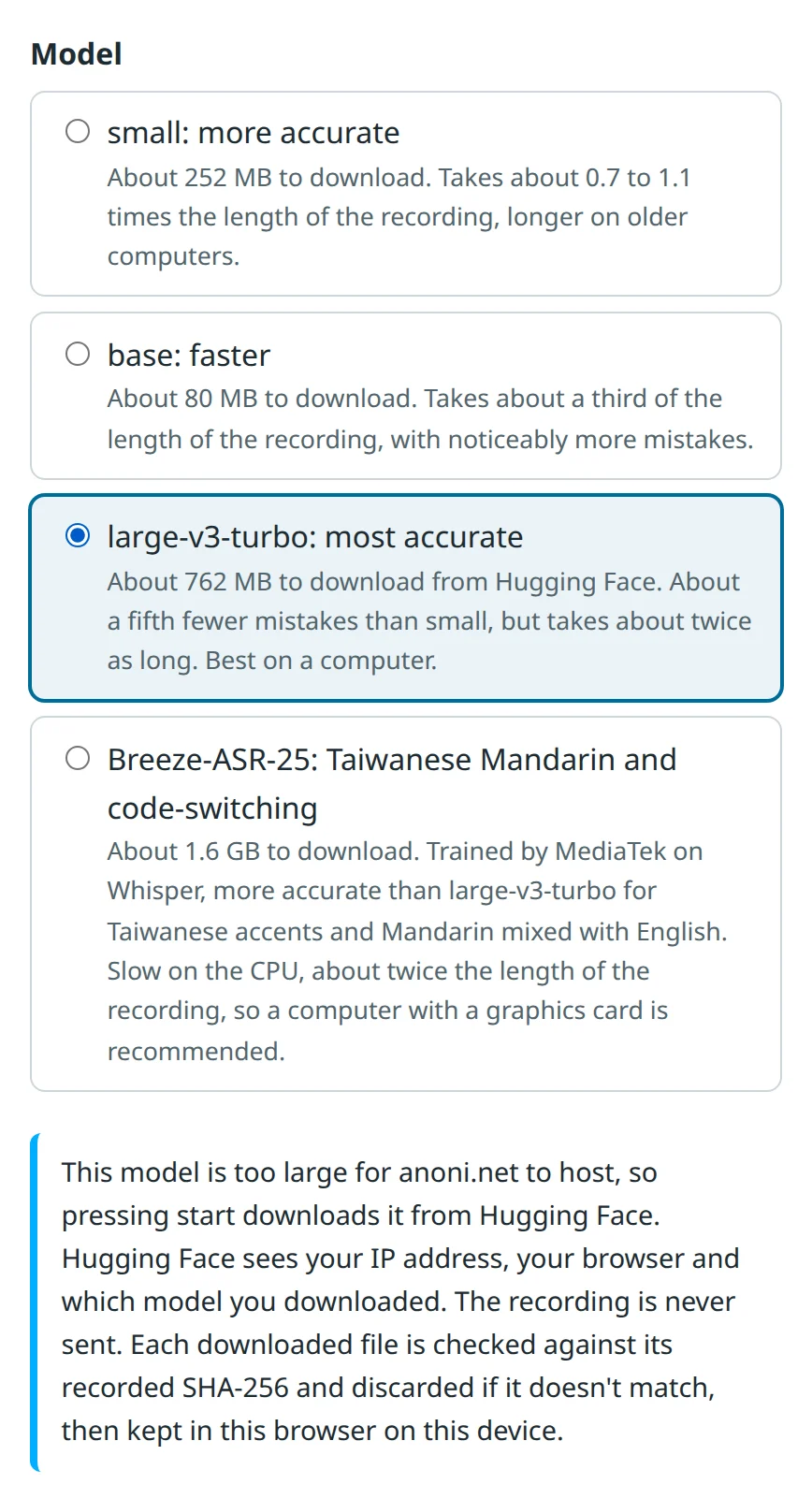
The large-v3-turbo transcription model is about 760 MB, too much traffic to serve from the community's host, so readers who choose it download it from Hugging Face. The button reads "Download from Hugging Face and start", and before it is pressed the interface explains that Hugging Face sees the IP address, the browser and which model was downloaded. The header CSP opens only the download paths of those models, pinned to a commit. Each file is checked against its SHA-256 once read and is not stored if it doesn't match, and the requests carry no cookies or Referer.
New outbound connections in dependencies
CSP is the last line of defence. The day-to-day work is searching a package for outbound URLs before upgrading it. When Gears first added face detection on 2026-10-15, it used MediaPipe. Searching the package while picking a version turned up a URL for odml.pa.googleapis.com that @mediapipe/tasks-vision gained in 1.0.0, so Gears stayed on 0.10.35, which predates that code. CSP can block such a request, but the block leaves errors in the console, and it is hard to know which path the package takes once its request fails, so a dependency's new outbound connections need to be caught at upgrade time. Later that day face detection switched to OpenCV's YuNet for accuracy, and MediaPipe left Gears altogether.
There is also a case only CSP can handle. The verification tool uses c2pa-web to check Content Credentials (provenance records that cameras and editing software attach to files). When it meets an identity assertion in them, the underlying c2pa-rs goes online to fetch the issuer's key, and there is no setting to turn that off (c2pa-rs issue #1645). CSP blocks that request. It is the only CSP error Gears expects to see, and the tests let through that one path and nothing else.
A link checker that never sends the link
A reader who receives a suspicious link by text message can paste it into the Gears link checker, which compares it against the list of fraud sites whose DNS resolution has been suspended, published by Taiwan's 165 Anti-Fraud Hotline. The obvious design is to send the link to a server for lookup, but the lookup log would add up to a record of who received which scam links.
When we checked on 2026-10-14, the list held 86,173 unique domains, about 1.5 MB as plain text and about 400 KB compressed, small enough to send whole to the browser. Gears downloads the list at deploy time and ships it to the reader's browser with the site, so the link never has to leave the device. Matching uses the full hostname, because the list includes subdomains on shared platforms and the whole platform should not be flagged as fraud. The list only contains domains that have already been suspended, and the interface says plainly that a link missing from the list is not necessarily safe.
We looked at expanding short links and decided against it. If a server followed links on the reader's behalf, anyone could learn the host's real IP with a short link of their own, and the server could be used as a stepping stone to probe internal networks. Scam texts also tend to give each recipient a different short link, so expanding one registers a click on the scammer's side and confirms that the reader got the message. When Gears meets a short link, it suggests asking the sender for the full address.
Cloudflare's injection and compression
The second mistake involved Cloudflare. anoni.net sits behind Cloudflare, which injects Web Analytics and JS Detections scripts into HTML responses across the whole zone. Gears' CSP blocks those scripts, but the page a reader gets should match what was built, so responses carry Cache-Control: no-transform to ask Cloudflare to leave the content alone.
At the first deployment on 2026-10-17, no-transform was set on every file. Cloudflare does not compress responses that carry it at all, and even undoes the gzip from nginx, so after launch the 1.5 MB 165 list and the 14 MB onnxruntime WebAssembly were both reaching readers at full size. Injection only happens in HTML, so now only pages and images carry no-transform (images to keep Polish from recompressing them). Everything else is left for Cloudflare to compress, and the WebAssembly shrinks by about three quarters.
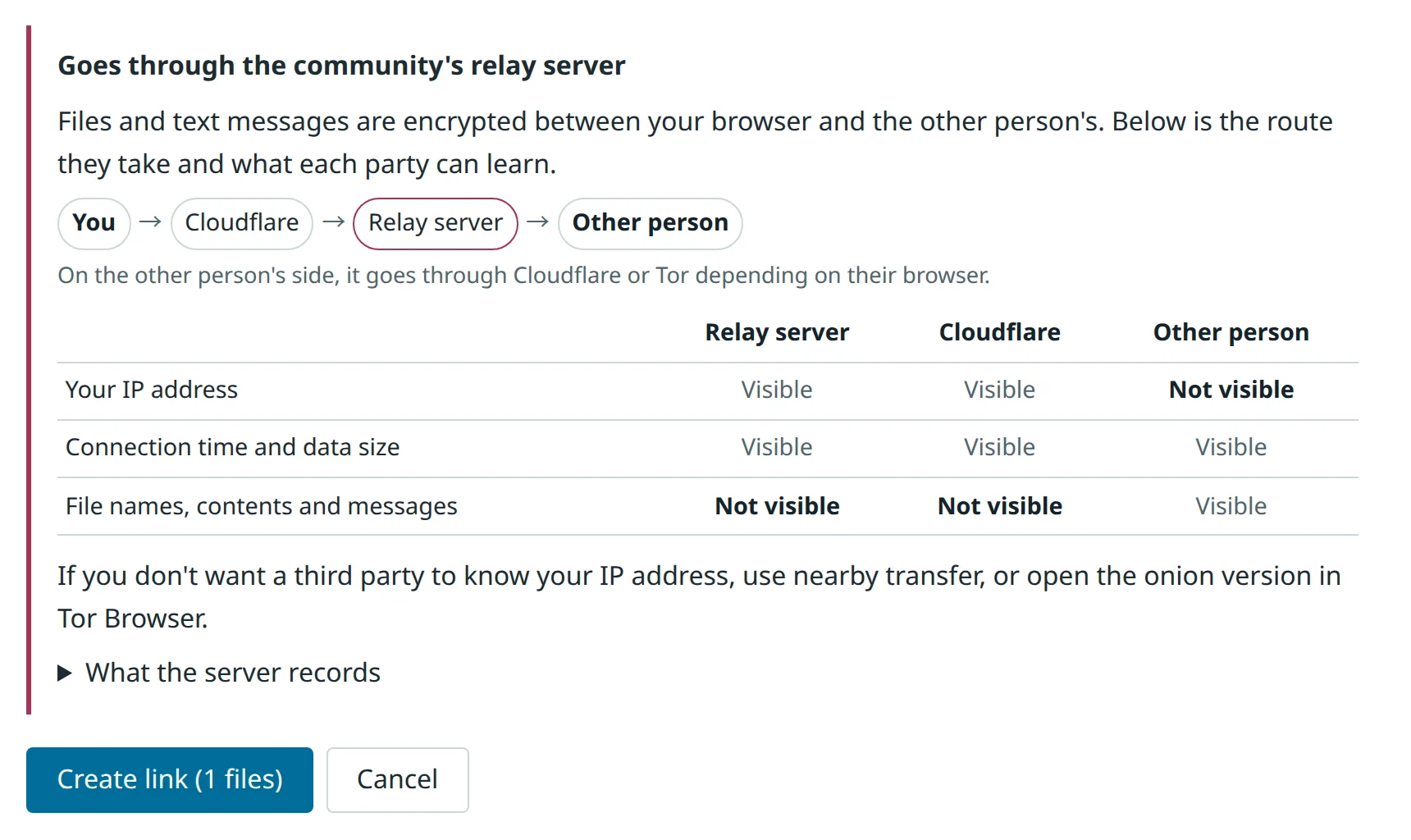
Cloudflare terminates TLS at its edge, so any file passing through it is plaintext to Cloudflare. Gears' principles therefore say that endpoints receiving file uploads do not go through Cloudflare. Remote transfer is the exception: its clearnet entry goes through Cloudflare because the content is separately encrypted between the two ends. The shared link carries a key after the #, and browsers never send what comes after the # to the server. The two ends derive their keys from it and encrypt every message with AES-256-GCM, so the relay and Cloudflare only ever handle ciphertext.
Cloudflare can still see both ends' IP addresses and connection times. The interface says so before a link is created, and the remote transfer server notes cover which servers are involved and what they record. Opening a shared link also requires pressing "Join" before anything connects. When a messaging app generates a link preview, it may open the URL on its own servers first, and if joining were automatic, the preview would use up the one-time room.
Usage analytics
Maintainers need to know which tools readers open, whether they finish, and where they fail. Gears does not load the Umami script; its code sends events straight to the community's self-hosted Umami, and the CSP opens only that one URL.
Each event may carry only allowlisted fields with allowlisted values, and an event that doesn't match is dropped entirely. File names, file sizes, file contents, text the reader types, links being checked, email senders, hashes and verification results are never sent, and screen sizes are rounded to the nearest hundred. Nothing is sent when the browser has Do Not Track or Global Privacy Control turned on, and the footer offers a choice to stop recording. The onion build removes this code entirely at build time, so its output contains no code that sends analytics.
Random data in Tor Browser
The third mistake surfaced while building the onion version on 2026-10-17. At the Standard security level, Tor Browser 15.0 returns random data from canvas getImageData and toBlob until the reader allows canvas access, without raising an error. Tools that read pixels back from a canvas, such as HEIC to JPEG and turning PDF pages into images, therefore produced images that looked normal but were filled with noise.
Now src/ui/canvas-access.ts draws four points and reads them back before any real read. If they don't match, the tool stops and asks the reader to allow canvas access from the icon in the address bar and press the button again, after which the same tab works normally.
The onion version lives at gears.<onion>, and after each build scripts/check-site.mjs --onion confirms that the output has no links to anoni.net on clearnet. Tor Browser has no service worker, so offline use is not available. Without cross-origin isolation, transcripts can use only one CPU core. WebRTC is switched off entirely, so nearby transfer does not work. All of these limits are stated in the interface, and where nearby transfer would be, readers are pointed to remote transfer or to OnionShare, which involves no server at all.
Current outbound connections
The table below gathers them in one place, to compare against the Network panel in the browser's developer tools:
| Where | When | What is sent, and who can see it |
|---|---|---|
| anoni.net's own domain | Opening a page, and the first use of a tool | Requests for pages, code and model files, never the reader's files |
| The community's self-hosted Umami | While using tools; nothing is sent with Do Not Track, Global Privacy Control or the opt-out | Tool identifiers, events and failure reason codes |
| The community's self-hosted Formbricks | When the reader submits "Suggestions & feedback" | What the reader wrote, which tool they came from, interface language and version |
| assets.anoni.net | When the reader picks a transcription model converted by the community | Requests for model files |
| Hugging Face | When the reader picks large-v3-turbo for transcripts and presses download | Requests for model files; Hugging Face sees the IP, browser and model downloaded |
| The remote transfer relay | When the reader creates or joins a remote transfer link | Content encrypted between the two ends; Cloudflare, which carries it, sees IPs and times |
| Cloudflare Realtime TURN | Video calls in remote transfer | Encrypted audio and video; TURN sees both ends' IPs |
The onion version has no analytics, and the community-converted models are served from the same onion site.
What is not done yet
When a reader on clearnet chooses to download the large model from Hugging Face, Hugging Face sees their IP. Video calls in remote transfer go through Cloudflare Realtime's TURN; a self-hosted coturn is configured and tested, and is waiting for a VPS.
CSP protects against a compromised dependency, not a compromised server: if the server is compromised, the page it sends and its CSP can both be swapped out. Confirming that the site runs the source code in the repo takes two comparisons. The first is between the site and the build branch. The site is built in public on GitHub Actions and the output is pushed to the repo's public build branch, so readers can already compare the files on the site against it.
The second is between the build branch and the source, which is reproducible builds: anyone building the same commit should get byte-for-byte identical files. That part is not done and has not been tested. One known obstacle is that the 165 list is downloaded at build time and the site is rebuilt automatically every Monday, so the same commit built in different weeks gets a different list, and with it a different service worker version.
Gears is still in beta, and the versions, numbers and file locations here reflect the state at the time of writing. Comments on the implementation are welcome as issues on anoni-net/gears, or through "Suggestions & feedback" in Gears.
Related reading
- Technical Design of Offline Reading and Local Encryption on the Docs Site: Gears' offline use and age encryption follow the same approach
- Remote transfer server notes: which servers the relay passes through, and what they can see and keep
- Gears design document: the full specification and tests for every design in this article